
email address finder
|2026-04-23
Email Address Finder: A Guide to 97%+ Accuracy in 2026
Find any B2B email address. This guide explains how an email address finder works, from AI-driven data sources to validation, and how to choose the right tool.
An SDR pulls a fresh target account list, opens LinkedIn, guesses three or four email formats, and pastes them into a verifier. Half the morning disappears before the first sequence even goes live. By afternoon, the CRM has duplicate records, the bounced emails start coming back, and nobody trusts the list enough to scale it.
That workflow still exists in a lot of teams. It’s slow, hard to audit, and expensive in ways that don’t show up on the software invoice. Every bad address wastes rep time, lowers confidence in outbound, and creates friction between SDRs, RevOps, and marketing.
That’s why the market for these tools has grown so quickly. The broader email finder tools market reached $13.9 billion in 2024 and is projected to reach $19.2 billion by 2032, according to Prospeo’s market overview of email lookup tools. Buyers aren’t paying for a simple lookup box. They’re paying for a repeatable way to turn partial contact data into reachable prospects.
Introduction The End of Manual Prospecting
Manual prospecting breaks first at the point of consistency.
One rep might find a valid address from a company website. Another might rely on pattern guessing. A third might export data from a browser extension and hope it’s current. The result is a pipeline built on mixed methods, mixed confidence, and no shared standard for what “verified” means.

An email address finder solves that operational problem. In plain terms, it takes what you know about a prospect, usually a name and company, then searches, predicts, and validates likely work emails before the record hits your sequence or CRM.
Used well, it becomes part of your go-to-market system rather than a standalone app. SDRs use it to build lists faster. RevOps uses it to standardize enrichment and reduce manual cleanup. Marketers use it to support account-based programs with better contact coverage.
Manual research feels cheap until you count the hours, the bounces, and the records your team can’t use twice.
The important distinction is that not every email address finder works the same way. Some depend heavily on one database. Others do better pattern generation but weaker verification. The strongest platforms combine multiple data sources, layered validation, and workflow integration so the output is useful in production, not just in a demo.
What Is an Email Address Finder and How Does It Work
An email address finder is a tool that identifies a likely work email for a person based on inputs like their name, company, domain, or profile data. The mechanics matter because “found” doesn’t always mean “safe to send.”
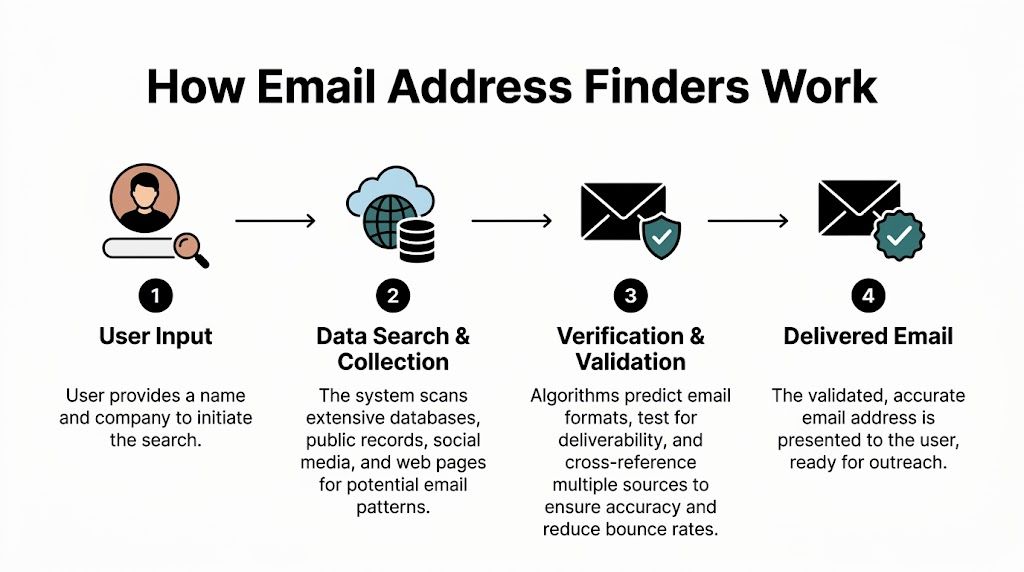
Data collection comes first
Most tools start by gathering evidence from public web pages, professional profiles, company websites, and contact databases. That gives the system raw signals about a company’s naming conventions, active domains, and known email patterns.
This is why a finder works better when you provide both the person’s name and the company domain. The more context the system has, the more precisely it can narrow the likely pattern instead of taking blind guesses.
Pattern generation fills the gaps
Once the system knows the company domain, it generates possible addresses such as first.last, first initial plus last name, or first name only. Better tools don’t stop at a handful of templates. They model which patterns are more likely by company, industry, and existing evidence.
According to Skrapp’s overview of email finder technology, advanced email finders use AI-driven pattern matching and public web scraping to generate candidate addresses, reaching 84-95% success rates on name+domain inputs by cross-referencing 700M+ professional profiles, and they outperform manual guesses by 5-7x in coverage. That’s the practical reason teams move away from spreadsheet-based prospecting.
If you want a useful companion read on the tactical side, Breaker’s guide on how to find business email addresses does a good job showing the common paths reps use before they formalize the process.
Waterfall enrichment is where the real separation happens
Single-source tools usually hit a ceiling. If their main database doesn’t have the contact, or if their pattern engine can’t verify it confidently, you get a miss.
A waterfall enrichment model handles this differently. It queries one source, then another, then another, in a prioritized order until it finds a result that passes confidence and validation checks. This approach is important because provider coverage varies by industry, company size, region, and freshness.
Consider this simple perspective:
| Approach | What happens | Common outcome |
|---|---|---|
| Single source | One database or one method gets queried | Fast when it has coverage, weak when it doesn’t |
| Pattern only | Tool predicts likely formats from name + domain | Better than guessing by hand, but still limited |
| Waterfall model | Multiple providers and checks run in sequence | Higher coverage and more consistent output |
That architecture is especially relevant for teams processing lists instead of individual lookups. A rep can tolerate a few misses one at a time. RevOps cannot tolerate inconsistent enrichment across thousands of rows.
Delivery matters more than discovery
The end product isn’t just an email string. It’s a contact record your team can use.
That means the finder should fit into the systems where work already happens:
- CRM enrichment so records don’t require manual cleanup
- Bulk uploads for account list building and event follow-up
- APIs and integrations for automated routing and outbound workflows
- Confidence signals so reps know what to send first and what to review
An email address finder is really a chain of sourcing, prediction, and verification. If any one layer is weak, the business feels it later.
Accuracy and Validation The Science of Deliverability
The biggest misunderstanding in this category is simple. A found email is not the same as a deliverable email.
An address can look correct, match a common pattern, and still bounce. That’s why validation sits at the center of any serious email address finder.
The validation stack
Most systems validate in stages. They check the syntax first. Then they confirm the domain exists, confirm that the domain is configured to receive mail, and finally test the mailbox at the server level.
According to AISDR’s breakdown of email finder verification, email finder tools typically reach 92-97% accuracy through sequential checks on syntax, DNS, MX records, and SMTP handshakes, and that process can reduce bounce rates in outbound campaigns by 40-60%.
Here’s the plain-English version of what each layer does:
- Syntax checks catch malformed addresses before anything else.
- Domain and mail server checks confirm that the company can receive email at that domain.
- SMTP validation asks the receiving server whether the mailbox appears to exist.
That final step is powerful, but it isn’t perfect.
Why catch-all domains create false confidence
Some companies use mail server settings that accept almost any address at the domain level. To a basic verifier, that can look like success even when the mailbox itself doesn’t exist.
The confusion for teams often stems from assuming “accepted by the server” means “safe to sequence.” In practice, it often means “possible, but still uncertain.”
Practical rule: Treat verification as a risk score, not a magic stamp.
The strongest workflows account for this by combining multiple checks, historical patterns, and fallback providers instead of trusting a single server response. That’s the difference between a tool that finds a lot of addresses and a system that protects your sender reputation.
Why deliverability is a revenue issue
Poor validation doesn’t just create bounce noise. It changes how mailbox providers view your domain and your campaign quality. Once trust drops, even valid emails can land in worse placements.
For teams that want a deeper look at verification workflows, this guide on how to validate emails is a useful next read.
A practical operating model looks like this:
- Find the likely address
- Validate before the sequence starts
- Route lower-confidence records for review
- Push only verified contacts into outbound automation
That sequence sounds operational because it is. Deliverability is not a copywriting problem first. It’s a data quality problem first.
Practical Use Cases for Modern Go-To-Market Teams
A rep pulls a list of target accounts on Monday morning. By lunch, they can either have a clean set of reachable contacts in sequence, or they can still be guessing at email formats in spreadsheets. The same tool sits behind both outcomes. The difference is whether the team uses email finding as a quick lookup feature or as part of a repeatable data system.

SDRs need speed without guesswork
For SDRs, the job is not “find an email.” The job is “find the right people at the right account fast enough to act while the signal is still fresh.”
A modern workflow usually starts with an account list, then adds likely stakeholders, then tests for the best available contact path. Waterfall enrichment matters here because it checks multiple data sources in sequence instead of stopping at the first partial match. Multi-stage validation matters for the same reason a pilot uses more than one instrument. One source can be wrong. Several checks together give the rep a safer record to work from.
That changes the rep’s day. Less time goes to hunting for formats and fixing bad data. More time goes to writing relevant messaging, choosing a trigger, and deciding who should enter the sequence first.
RevOps needs a system, not scattered lookups
RevOps usually inherits the consequences of bad collection habits. One rep exports contacts from a browser extension. Marketing imports a different version later. Fields stop matching, ownership gets muddy, and reporting starts to drift.
An email finder only creates operational value if it fits the rest of the data flow. That means bulk processing, APIs, CRM sync, permissions, and clear rules for when a record is ready for outbound. RevoScale is one example of a platform teams use in that context. The primary question is not whether a user can find one contact. It is whether the team can run enrichment the same way every time.
Pricing also matters more here than many teams expect. Credit-based plans can work for occasional research, but they often make usage unpredictable across SDR pods, agencies, or high-volume outbound programs. Unlimited pricing can be more useful when the goal is standardized coverage across large lists, because the team stops rationing lookups and can build the process around data quality instead of credit conservation.
Clean enrichment is a data operations discipline, not just a convenience for reps.
Marketers need depth inside target accounts
Demand gen teams often already know which accounts matter. The harder part is building enough verified contact coverage inside those accounts to support webinars, event follow-up, partner campaigns, and ABM programs.
Accuracy has a direct planning impact. If the finder performs well only on common U.S. naming patterns, campaign reach drops as soon as the list includes subsidiaries, regional teams, or international markets. A tool with stronger global coverage helps marketing build audiences that match the account strategy instead of shrinking it.
Good coverage also improves orchestration. A campaign can route the right message to a regional leader, a department head, or an operations contact instead of sending one generic touch to whoever happened to be easiest to find. Teams refining the outbound side of that process should also review this guide on how to send a proper email.
A quick walkthrough helps tie it together:
Agencies need predictable delivery and predictable cost
Agencies run into a different operating problem. They are managing many client segments, many ICPs, and many send volumes at once.
That makes workflow design and pricing structure unusually important. A credit-based model can turn list building into a budgeting exercise, especially when one client needs broad TAM coverage and another needs deep enrichment inside a narrow set of accounts. An unlimited model is often easier to plan around because ops teams can standardize QA steps, rerun enrichment when lists change, and avoid treating every lookup like a scarce resource.
Agencies also feel compliance risk more sharply. One weak process can affect several client programs. They need clear provenance, suppression handling, and consistent rules for which records are allowed into campaign systems. For them, an email finder is part of service delivery, margin control, and client trust all at once.
How to Choose the Right Email Address Finder
Most buyers compare tools by surface features first. Browser extension, bulk search, CSV upload, enrichment fields. Those matter, but they don’t tell you whether the system will hold up under real outbound volume.

Start with the hard questions
Ask vendors questions that expose the architecture, not just the interface.
- Where does the data come from. Public web sources, databases, pattern generation, or some mix?
- How is the email validated. Is there layered verification or only pattern confidence?
- What happens on bulk jobs. Does performance stay stable when you upload large files?
- Can the tool fit your stack. CRM sync, API access, and workflow automation matter more than an attractive search box.
If a team can’t explain how it gets from input to verified output, you’re probably buying a black box.
Global coverage is where many tools weaken
A lot of products look solid on U.S. domains, then degrade when your team expands internationally. That shows up in multilingual naming conventions, regional domain practices, and weaker provider coverage outside core markets.
SalesHandy’s analysis of email finder tools notes that bulk enrichment accuracy decay for non-US domains is often underexplained in tool content, with reviews reporting 40-60% accuracy drops for EMEA/APAC domains when teams rely on single-source tools. That’s one reason multi-provider waterfall systems hold up better on global lists.
For any team selling internationally, ask for clarity on:
- Regional coverage by market, not just overall claims
- Bulk behavior on EMEA and APAC uploads
- Provider diversity so one weak source doesn’t sink the whole job
Pricing model changes behavior
This part gets less attention than it should. Credit-based pricing affects how people use the product.
When every lookup costs credits, reps ration searches. RevOps limits test runs. Agencies hesitate to enrich full account lists because each pass increases spend. That creates strange incentives. Teams end up sampling data instead of building complete workflows.
Flat-rate pricing changes the operating model. You can enrich more records, rerun workflows, clean old lists, and support more experimentation without treating every row like a budget decision.
A simple comparison makes the tradeoff clearer:
| Model | Team behavior it encourages | Main drawback |
|---|---|---|
| Credit-based | Controlled usage, selective enrichment | Teams hesitate to run broad or repeated workflows |
| Unlimited | Full-list enrichment, routine hygiene, easier experimentation | Buyer must verify that quality and integrations are still strong |
If unlimited usage matches your process, an unlimited email finder is worth evaluating closely.
Choose for workflow durability
The right tool should still make sense after implementation, not just during procurement. That usually means:
- Integrations that reduce manual movement
- Bulk handling that doesn’t collapse under volume
- Pricing your team won’t work around
- Validation you can trust before launch
A buyer’s guide should end with one simple standard. If the tool only works when usage is light, the data is domestic, and one rep runs it manually, it won’t support a modern go-to-market team.
Navigating Legal and Ethical Considerations
Accuracy gets the attention. Compliance carries the risk.
A lot of teams assume that if an email is public, outreach is automatically safe. That assumption can create problems fast, especially when nobody can document where the data came from, why it was collected, or how opt-outs are handled.
Compliance starts before the first send
Hunter’s discussion of email finder compliance risk highlights an important point: a 2025 EU GDPR fine of €1.2M against a lead generation firm for unverified email scraping shows the exposure here, and 80% of SDRs overlook these risks according to HubSpot’s 2025 State of RevOps report.
That should change how teams evaluate email address finder workflows. The key questions aren’t only about match rates. They’re also about sourcing, retention, access control, and proof.
For teams working under European privacy rules, this primer on lawful basis for data processing under GDPR is a practical reference because it forces the right conversation early.
If your team can’t explain why a contact is in the system and how it got there, your process is incomplete.
Operational safeguards matter
Legal review tends to focus on policy. Day-to-day risk often sits in operations.
That includes role-based access, auditability, secure handling, and documented data flows between enrichment, CRM, and outreach systems. Features like SOC 2 Type II, SSO, and RBAC matter because they limit who can do what and create a cleaner operating trail when someone asks for proof.
The ethical standard is straightforward. Use data responsibly, document your reasoning, and don’t confuse technical possibility with business permission.
Conclusion Put Your Data Strategy to Work
An email address finder belongs in the same category as your CRM rules, routing logic, and enrichment workflows. It affects how reliably your team turns account lists into conversations.
The difference between a tool that helps and a tool that creates noise usually comes down to process design. Good systems pull from multiple sources in sequence, then test the result through several validation checks before a rep ever hits send. That is the logic behind waterfall enrichment and multi-stage validation. It works like quality control on a production line. Each step removes a different kind of error, so the final record is more usable.
Pricing shapes behavior just as much as match rate. A credit-based model often makes teams ration searches, skip rechecks, or avoid enriching broader account lists. An unlimited or flat-rate model changes the operating pattern. SDRs can research more freely, marketers can fill gaps across target accounts, and RevOps can build repeatable workflows without debating the cost of every upload.
That has real downstream effects.
Sales gets more verified contacts and fewer wasted touches. Marketing gets better account coverage for segmentation and campaign planning. RevOps gets a cleaner system because enrichment and validation are treated as an ongoing process, not a one-time export. Teams working across regions also need to pressure-test coverage quality, consent standards, and data handling, because global accuracy and compliance are not evenly distributed across providers.
If your current workflow still depends on guessed formats, one-off browser lookups, and stale CSVs, the problem is larger than rep efficiency. Your go-to-market system is missing a dependable way to source, verify, and maintain contact data.
If you want to test a flat-rate option, RevoScale offers a free trial and sign-up at https://app.revoscale.io/auth/sign-up.