
email extractor
|2026-05-11
Build a Scalable Email Extractor Pipeline in 2026
Ditch outdated email extractor tools. Build a scalable B2B data pipeline with 97%+ accuracy using modern validation and enrichment in our 2026 guide.
You can usually tell when a team is relying on a basic email extractor before you open the tool stack. There's a CSV on someone's desktop, half the rows are missing titles, the CRM has duplicate contacts, and the outbound team is arguing about whether the copy is weak when the true problem is the data.
That workflow feels productive because it creates motion fast. It doesn't create a reliable pipeline. If your prospecting process starts with scraping addresses and ends with manual cleanup, you're not running outbound. You're running list repair.
Why Your Email Extractor Is Hurting Your Outreach
A lot of SDR teams still use an email extractor the same way people used them years ago. Find a website, pull whatever addresses show up, dump the file into a sequencer, and hope verification catches the damage later. That used to be common because email extraction started as a way to harvest addresses from websites, and by 2015 tools like Email Hunter had made real-time browser extraction widely accessible. The problem was quality. Those early methods often produced bounce rates of 20 to 30%, which made sender reputation unstable and cleanup constant, as noted in the Email Hunter reference.
That pattern still shows up today in a different form. The interface looks cleaner, the extension runs faster, but the workflow is still brittle. You get an email address without enough context to decide whether the person belongs in your ICP, whether the company is active in your market, or whether the contact record should even make it into your CRM.
Where the pain actually shows up
The first hit is usually hidden. Reps spend time fixing names, removing role accounts, checking company size, and guessing whether a contact is relevant. Then the campaign launches and the symptoms become visible:
- Bad fit: The list contains people who technically exist but shouldn't receive the message.
- Missing context: There's no firmographic or role data to segment properly.
- Manual cleanup: Ops has to normalize fields before sales can use the records.
- Weak deliverability: Old or risky emails make the whole sending system less reliable.
A bad list makes good copy look bad.
That's why the conversation has to move past extraction. If you're working on scaling pipeline via B2B email outreach, the limiting factor isn't whether you can pull an address from a page. It's whether you can source, verify, enrich, and route prospect data without creating new cleanup work every week.
What replaces the old approach
A modern outbound system starts with a different assumption. An email address alone isn't a prospect record. It's one field inside a usable record.
That means the job of an email extractor isn't just collection anymore. It has to support a broader operating model that includes validation, enrichment, routing, and ongoing hygiene. Teams that build around that model stop thinking in terms of one-off list pulls and start building a repeatable data engine.
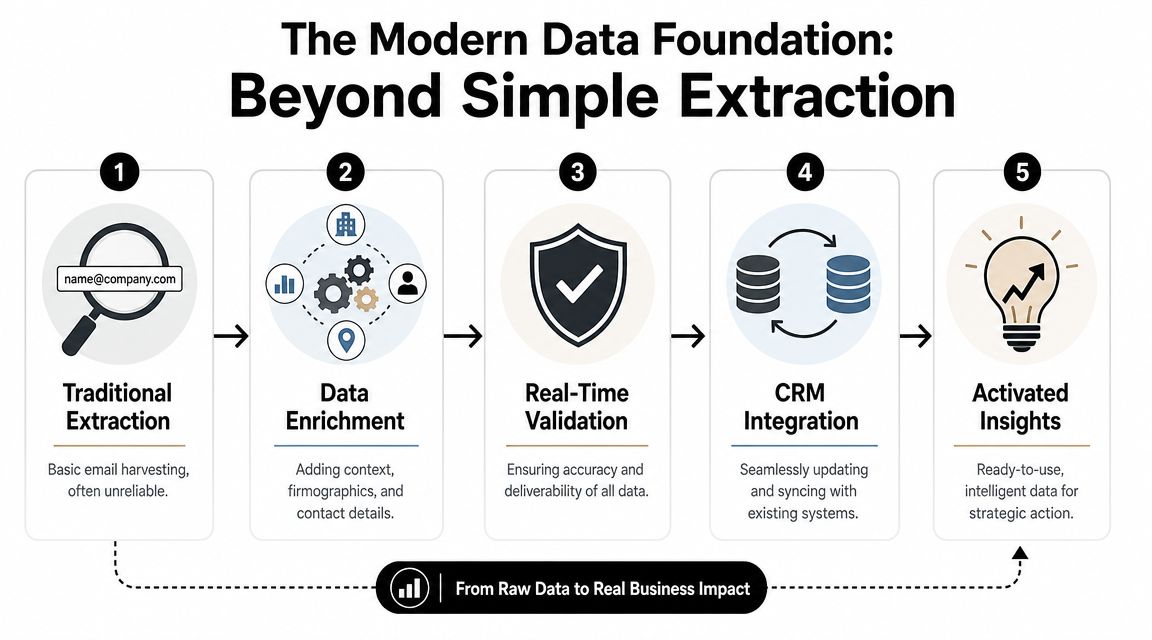
Beyond Simple Extraction The Modern Data Foundation
The old idea of an email extractor is too narrow for modern outbound. A scraped address can't tell you whether the contact still works there, whether the mailbox accepts messages safely, or whether the account belongs in the segment your reps are targeting. If you only optimize for “find more emails,” you usually create a downstream accuracy problem.
That's why single-source tools break down at scale. Real-world tests show accuracy can fall to 60 to 75%, and teams using single extractors had 28% higher bounce rates in HubSpot's Q1 2026 data, according to this analysis of email extractor performance. The shift is toward waterfall enrichment, where a system checks 50+ providers to improve coverage and reach 97% accuracy.
The pipeline has four jobs
Efficient operations require a data foundation with four distinct functions:
| Function | What it does | What happens if it's missing |
|---|---|---|
| Sourcing | Finds contacts from domains, profiles, business databases, and other inputs | You rely on scattered manual research |
| Verification | Confirms the address is structurally sound and deliverable | Bounces rise and sender trust drops |
| Enrichment | Adds title, company data, phones, and context | Reps personalize from incomplete records |
| Maintenance | Refreshes records and syncs changes into systems | CRM quality decays fast |
That is the primary distinction between a basic email extractor and a prospecting data layer. One gives you rows. The other gives you usable records.
Why extensions and scrapers hit a ceiling
Chrome extensions still have a place for quick spot checks. They're useful when a rep wants to inspect one company or validate one lead during research. They're weak when they become the center of the workflow.
Here's where they usually fail:
- They don't age well: Contact data changes, and one-time extraction doesn't account for that.
- They return shallow records: You may get an address but not the surrounding data needed for routing and prioritization.
- They create fragmented operations: CSV exports move between sales, ops, and marketing with no shared source of truth.
- They increase compliance exposure: Scraping practices can conflict with platform rules and privacy expectations.
Practical rule: Don't judge an email extractor by how many rows it exports. Judge it by how many clean records your team can use without touching a spreadsheet.
What a modern foundation looks like
The better model is closer to infrastructure than tooling. You start with a company list, domain list, LinkedIn profile set, or local business search. The system then finds likely contacts, checks them across multiple providers, validates them in real time, enriches the record, and pushes the result into the next workflow.
That's the standard teams should use when evaluating any email extractor in 2026. If the product can't support sourcing, verification, enrichment, and maintenance in one operating flow, it's not a foundation. It's a partial step.
Building Your Prospecting List with RevoScale
The fastest way to improve outbound isn't writing more prompts or swapping subject lines. It's fixing list construction. Many sales organizations build poor lists because they start with too much noise and too little structure.
A better approach starts with a tight prospect definition. For example, you might need every VP of Marketing at US-based fintech companies with a mid-market employee range, or every operations leader at agencies serving ecommerce brands. That gives the system something precise to work from before any emails are found.

Start with the input you already have
Most prospecting programs begin from one of four sources:
Company domains If you already know target accounts, upload the domains first. This is one of the cleanest ways to build account-based lists because domain-level matching reduces ambiguity.
LinkedIn profiles This works well when your reps or recruiters have already identified named people. It's also useful when your team is turning hand-picked targets into complete contact records.
Existing CRM exports This is the right move when you need to fill missing emails, phones, or enrichment fields across old records.
Local business searches For agencies and geo-targeted teams, business discovery from maps results is often more useful than a generic website scraper.
The practical advantage of an all-in-one workflow is that you don't need separate tools for each input type. An unlimited email finder should be able to accept bulk records, enrich them, verify them, and return a list that's ready for routing instead of forcing you into a find-export-clean-repeat cycle.
Build for segmentation, not just volume
A raw contact list isn't useful until it matches how your team sells. The record needs to support territory logic, messaging branches, and ownership rules.
Use fields that help answer operational questions:
- Role relevance: Is this person a buyer, influencer, or non-fit?
- Company context: Does the account match the segment your team works?
- Channel coverage: Do you have email only, or email plus phone and profile data?
- Routing readiness: Can the record move into a sequence or CRM without manual edits?
A lot of teams miss this step and then wonder why personalization is weak. The problem isn't usually the writer. It's that the source data never gave the writer enough context.
Teams that want stronger prospecting outcomes usually get more lift from better list design than from rewriting the same sequence again.
If you want a useful companion read on shaping outreach around better targeting, this sales prospecting best practices guide is a strong operational reference.
Think in batches, not one-off searches
Prospecting breaks when list building depends on individual rep effort. You want a process that can handle campaign-sized batches, territory refreshes, and CRM backfills without changing tools halfway through.
RevoScale supports bulk processing up to 250,000 records and flat-rate usage, which matters if you're tired of planning around credit burn instead of prospect coverage. That model is also useful for agencies managing multiple client datasets and internal teams running frequent refreshes.
There's also a practical lesson from adjacent use cases. If you've ever seen creators or media teams use a targeted email search guide for podcast hosts, the logic is familiar. Good search starts with clear targeting criteria, then turns discovery into a structured outreach list. B2B prospecting works the same way, just with more workflow complexity and stricter data hygiene requirements.
Ensuring 97% Accuracy with Real-Time Validation
Finding an address is the easy part. Deciding whether it's safe to use is where most email extractor tools separate. A system can return a plausible pattern and still hand you a risky record that damages your sending reputation.
That's why validation has to happen inside the enrichment workflow, not as an afterthought. Effective extraction uses a multi-step waterfall methodology that combines pattern matching, sequential provider queries, and a 5-step verification process that checks syntax, MX records, and SMTP connectivity, according to this review of verification methods and extractor benchmarks. In a 2,500-contact test, some tools returned more emails but had validity as low as 35.5%, while a precision-focused approach reached 98% validity on found contacts.

What high-accuracy validation actually checks
A serious validation workflow does more than look for an “@” and a domain. It asks a chain of practical questions:
- Syntax check: Is the address formatted correctly?
- Mailbox infrastructure check: Does the domain accept mail through valid mail routing?
- Server response check: Does the receiving system signal that the mailbox is likely reachable?
- Catch-all assessment: Is the server configured in a way that can hide bad addresses behind generic acceptance?
- Risk filtering: Does the address fall into categories that create unnecessary deliverability risk?
Any one of these checks on its own is incomplete. Combined, they give ops and outbound teams a much better read on whether a contact should move forward.
Why waterfall logic beats single-source lookup
Single-source lookup sounds efficient until it misses or mislabels a contact. One provider may have stale data. Another may have the right email but no role confidence. Another may identify the person but fail verification.
Waterfall enrichment fixes that by moving through multiple providers in sequence. The system starts with likely matches, checks additional sources when confidence is low, and cross-validates the result before writing it back.
That's the core reason a broader enrichment system is more dependable than a lightweight email extractor. The goal isn't maximum row count. It's the highest possible number of records that your team can contact without cleanup.
Good data means more than a valid inbox
A valid business email matters, but outbound execution usually needs more than that. SDR teams want fields that support prioritization and personalization. RevOps wants records that can route cleanly. Managers want campaign reporting tied to meaningful segments.
Useful enrichment often includes:
| Field type | Why it matters in practice |
|---|---|
| Job title and seniority | Helps route by persona and tailor messaging |
| Company attributes | Supports segmentation by market, size, and fit |
| Mobile phone data | Expands channel coverage for multi-touch outreach |
| Social profile data | Gives reps context before they send or call |
| Additional company fields | Helps score and prioritize accounts |
That's where email validation workflows should connect directly to enrichment instead of living as a separate cleanup step. If the system finds an email but doesn't return the surrounding record, reps still have to do manual research.
A similar comparison shows up when teams evaluate a Hunter.io alternative. The question isn't just whether the tool can locate an address. It's whether it can verify the result, append enough context to make the contact actionable, and do that consistently in bulk. For teams comparing options more broadly, this review of the best email validation tools in 2026 is useful because it frames validation as part of data operations, not just list cleaning.
The safest outbound programs treat validation as a gating step. If a record can't pass, it doesn't enter the sequence.
Automating CRM Hygiene and Activating Your Data
Most prospecting systems don't fail at lead discovery. They fail after discovery. The list gets built, someone exports a file, fields don't map cleanly, and the CRM starts drifting back toward incomplete records within days.
That's why CRM hygiene has to be part of the same operating system as your email extractor. If enrichment and verification stop at export, your team is still relying on manual ops work to keep data usable.

Keep records alive after the first sync
The point of a CRM isn't storing names. It's giving sales and marketing a current operating picture. That only works when records stay aligned with reality.
A clean workflow usually includes:
- Automatic field updates: New contact or company details replace stale values instead of creating side spreadsheets.
- Duplicate control: Matching logic prevents the same person from entering through multiple sources.
- Status-based routing: Records move to the right rep, campaign, or nurture path based on current data.
- Ongoing refreshes: Existing contacts don't sit untouched until a rep notices a problem.
If you're evaluating platforms for this part of the stack, the central question is whether data can move directly into the systems your team already uses. RevoScale's native integrations matter here because enrichment only becomes operational when it syncs into the CRM and outreach tools without extra formatting work.
Activation matters more than storage
Many teams over-focus on list building and under-focus on activation. A contact record that never reaches a workflow has no pipeline value.
Good activation means the data can immediately support:
- Outbound sequencing across email, phone, or LinkedIn
- Lead routing based on territory, segment, or persona
- Marketing segmentation for retargeting or nurture programs
- Pipeline reporting tied to real contact and account attributes
A useful benchmark for evaluating this is whether your team can go from raw records to active outreach without CSV repair. If the answer is no, the process still has a manual bottleneck.
For teams redesigning that end-to-end motion, this guide to automated lead generation software is a practical reference because it connects enrichment, routing, and execution in one workflow.
Compliance isn't optional
Cheap scraping workflows create legal and operational risk that a lot of teams underestimate. Many guides skip this entirely, which is a mistake. A 2025 EU report linked 40% of over 1,200 fines for unsolicited B2B emails to scraped lists, and scraping often violates platform Terms of Service, which can lead to account suspensions, according to this discussion of scraping risks and compliant alternatives.
Compliance problems usually start as data sourcing problems.
The practical takeaway is simple. If your process depends on crude scraping from platforms that don't permit it, you're taking on risk before outreach even begins. API-based waterfall enrichment from vetted providers is the cleaner model because it supports both accuracy and sourcing discipline.
Conclusion From Email Extractor to Revenue Engine
A rep exports a few thousand contacts from an email extractor on Monday. By Thursday, sales is sorting bounces, operations is fixing duplicates, and marketing is questioning whether any of the firmographic fields can be trusted. That pattern is common because extraction only collects raw records. It does not create a usable prospecting system.
Revenue teams need more than emails. They need validated contacts, account context, routing logic, clean CRM sync, and a sourcing process that holds up under compliance review. If any of those steps live in spreadsheets or disconnected tools, the handoff cost shows up later in poor deliverability, broken reporting, and rep time spent fixing data instead of working pipeline.
Mailmeteor notes in its overview of email extractor tools and workflow automation that automation cuts manual prospecting work. That only helps if the workflow is connected end to end. Cheap extractors still leave teams to handle verification, enrichment, deduplication, ownership rules, and activation somewhere else.
A basic extractor can support one-off research. It does not support a repeatable outbound operation.
The better standard is simple. Build a pipeline that can source, validate, enrich, sync, and activate records without manual cleanup at the end. RevoScale fits that operating model because those steps run in one system, which reduces failure points and gets clean records into sales workflows faster.
Evaluate the process, not the scrape. If your team cannot turn raw records into compliant, sales-ready data without CSV repair, the bottleneck is still there.