
email scraper
|2026-05-10
Email Scraper Guide: Risks & Better Alternatives for 2026
What is an email scraper? Learn how they work, the significant legal and deliverability risks, and why modern B2B data platforms are a better alternative.
A stale CRM creates a predictable kind of panic. Pipeline coverage looks thin, reply rates are soft, and the team gets the same instruction it always gets: find more prospects fast.
That's usually the moment someone suggests an email scraper.
I get the appeal. I've run RevOps for teams that needed net new contacts yesterday, not next quarter. When quotas move up and database quality moves down, an email scraper looks like a cheap shortcut. Point it at company sites, directories, or social profiles, export a CSV, hand it to the SDR team, and call it progress.
The problem is that scraped volume feels like pipeline creation when it's often just technical debt in disguise.
You don't just inherit a list. You inherit questionable sourcing, uneven accuracy, compliance exposure, and future deliverability problems that sales has to absorb later. Marketing feels it when campaigns underperform. SDRs feel it when sequences die in spam. RevOps feels it when the team starts distrusting the CRM because nobody knows what data is real anymore.
That's why serious revenue teams are moving away from the old email scraper model. This isn't just a tool decision. It's a data strategy decision.
The Tempting Shortcut to a Bigger Pipeline
An SDR has a patch to cover, a manager asking for more meetings, and a list of accounts with missing contacts. They can spend hours hunting for the right people manually, or they can open an email scraper and pull addresses from the public web in bulk.
Companies rarely opt for scraping due to recklessness. They select it because alternatives appear slower. These groups require coverage immediately. They need names and emails immediately. They require something the team can load into a sequencer before the day ends.
That instinct is understandable. It's also where a lot of outbound programs start drifting off course.
A scraped list can make a dashboard look healthier for a week. More records. More accounts touched. More activity. But none of that tells you whether the contacts are current, usable, compliant, or safe to email.
Practical rule: If a prospecting method creates more cleanup work for RevOps than qualified conversations for sales, it isn't a growth lever. It's drag.
The problem isn't that an email scraper exists. It's that teams often treat it like a lead generation solution when it's really a blunt extraction method. It can pull visible data from the web. It can't guarantee that the data is current, permission-safe, or worth sending from your domain.
That's why I stopped looking at scraping as a top-of-funnel accelerator. I started looking at it the same way I look at bad imports, broken automations, and duplicate account logic. It's debt. And debt in your prospecting workflow always gets paid somewhere else.
What Is an Email Scraper and How Does It Actually Work
An email scraper is software that scans web pages and tries to pull out anything that looks like an email address. The easiest mental model is a robot moving through a library, opening pages, reading visible text and underlying code, and grabbing every string that matches the pattern of an email.

How the process usually works
Most modern tools follow the same basic flow:
They crawl pages The tool starts with one or more URLs, loads the page, then follows internal links to other pages.
They parse the content The scraper reads the HTML and visible text on each page.
They look for email patterns It uses pattern matching to find strings that resemble an email address.
They export the results The output usually lands in CSV, JSON, or another simple format that can move into a CRM or sales tool.
That sounds clean. It rarely is.
According to Apify's email scraper documentation, modern cloud-based email scrapers typically use recursive HTTP crawlers combined with HTML parsing and regex pattern matching to extract email addresses from web pages, and many advanced tools layer in DNS MX or SMTP validation checks to reduce bounce-prone addresses. The same source notes that benchmarked systems improved potentially deliverable emails from roughly 55–70% in raw scraping to 80–90% after validation.
Why that still doesn't solve the core problem
Validation helps, but it doesn't fix sourcing. A scraper can tell you whether an email address looks deliverable. It cannot tell you whether the contact should be in your outbound workflow, whether the data is current in a business sense, or whether the path used to collect it creates compliance risk.
That distinction matters.
A scraper is reading what's available in public-facing pages. It isn't building context around job changes, buying relevance, ownership logic, or consent standards. It's extracting text.
A working email address and a usable prospect record are not the same thing.
Why scrapers became common
Email scraping has been around for a long time, but it used to be a developer-heavy workflow. Earlier tools required code and technical skill. Later products added visual interfaces, which made scraping accessible to non-technical teams and turned it into a mainstream prospecting tactic.
That accessibility is why the category persists. It feels operationally simple. But easy extraction isn't the same as a sound revenue process.
Why Sales and Marketing Teams Use Email Scrapers
Teams use an email scraper because the underlying goals are legitimate. Sales needs more contacts inside target accounts. Marketing wants broader reach into a segment. Agencies need a repeatable way to build prospect lists across multiple clients.

The pressure is real
Prospecting pressure creates simple incentives:
SDRs need net new contacts When account lists are strong but person-level data is weak, scraping looks like a quick fix.
Marketers want faster list building Especially in lean teams, the promise of bulk contact collection is hard to ignore.
Agencies need throughput If you're serving multiple clients, manual research doesn't scale well.
Email scraping has been a staple of digital prospecting since the early 1990s, and the move to visual interfaces made it broadly accessible, with modern scrapers offering accuracy rates typically ranging from 60% to 95% according to Skrapp's overview of email scraping.
Common use cases
I've seen teams reach for scrapers in a few predictable scenarios:
Territory expansion A rep gets a fresh vertical and needs contacts across dozens of accounts.
Account-based outreach A team knows the companies it wants, but not the right people within them.
Market mapping Marketing or strategy teams want a rough contact layer for research.
Agency fulfillment Client asks for list growth this week, not after a long sourcing project.
None of those goals are bad. The problem is the method.
A lot of teams confuse speed of extraction with speed to pipeline. They're not the same. Fast list creation can still slow down campaign performance if the data introduces more bounces, spam complaints, manual cleanup, and rep frustration later.
That's why I don't dismiss the demand behind scraping. I dismiss the assumption that scraping is the right way to meet it.
The Hidden Costs and Dangers of Email Scraping
A scraper rarely breaks your pipeline on day one. It drags your team into a slower, riskier system that gets more expensive every quarter.

Legal and compliance risk
Teams usually notice the volume first and the exposure later.
According to Cleverly's analysis of email scraping tools, 67% of B2B sales teams worry about legal risks from their prospecting tools. They should. Scraping pulls contact data from public pages, profiles, and directories without giving your team a clean record of consent, source permissions, or collection standards.
That gap matters in real operations. If compliance, legal, or a customer asks where a record came from, your team needs more than “we found it online.” You need source lineage, collection logic, and a defensible reason the record belongs in your system.
RevOps teams inherit this mess. Once scraped data enters the CRM, every workflow built on top of it inherits the same uncertainty. That is technical debt. It remains dormant until an audit, complaint, or policy review forces someone to trace records that were never governed properly.
Deliverability damage usually arrives first
Legal risk gets attention. Inbox placement gets hit sooner.
Cleverly also found that 27% of emails from a popular scraping tool were classified as risky. You do not need many low-confidence contacts to hurt performance. A weak list drives bounces, spam complaints, and poor engagement. Inbox providers respond by treating your domain like a sender that cannot control list quality.
The cost is operational, not theoretical. Reps burn sequence capacity on contacts that should never have been loaded. Marketing spends time diagnosing reply-rate drops that started with bad data. Ops teams end up cleaning lists after campaigns fail instead of preventing the failure upstream.
If your team is still using scraper-led sourcing, fix validation immediately. Start with a clear process for how to validate emails before records ever reach a live sequence.
Operational takeaway: Sender reputation is hard to build and easy to damage. Low-confidence contacts should be blocked early, not explained away after the bounce report.
Data quality creates technical debt
This is the cost teams miss.
Scraped records often arrive with missing names, generic inboxes, stale job titles, duplicate entries, and almost no context for routing or segmentation. That forces every downstream team to compensate for bad inputs. Sales has to guess whether the contact is real. Marketing has to suppress junk domains and vague personas. Ops has to repair field values, merge duplicates, and explain why reporting no longer matches reality.
None of that work creates pipeline. It is maintenance caused by a sourcing choice.
A healthy prospecting system makes the CRM more reliable over time. Scraping does the opposite. It floods core systems with records faster than your team can verify, enrich, and govern them. That is why the scraper debate is not really about one tool. It is about whether you want your revenue engine built on extraction or on verified data quality.
A simple test exposes the problem:
| Question | If the answer is no |
|---|---|
| Can you explain where the contact came from? | You have lineage risk |
| Can you verify the person is still relevant to the account? | You have targeting risk |
| Can sales trust the field values in the CRM? | You have workflow risk |
| Can compliance review the sourcing path confidently? | You have governance risk |
Platform terms matter more than teams admit
Many scraping workflows depend on platforms that did not authorize bulk contact extraction in the first place. That creates risk even before you evaluate the data itself.
If your outbound motion relies on scraping sites that restrict that behavior, your team is building on access you do not control. Policy changes, account restrictions, blocked automations, and sudden shutdowns can remove a core part of your prospecting process overnight. That is not a stable revenue system. It is a fragile workaround.
This short walkthrough captures the broader concern around scraping-led outreach:
The strategic mistake
The actual mistake is not trying a scraper once. The mistake is accepting scraper logic as part of your operating model.
Teams that normalize scraping usually normalize bad incentives with it. Volume starts to matter more than confidence. Cleanup gets treated as a routine cost of doing business. Compliance review happens only after someone raises a problem. That is how technical debt enters a pipeline engine.
A compliant enrichment platform like RevoScale is not just a safer vendor choice. It is a better operating decision. It gives RevOps, sales, and marketing a cleaner system to trust, measure, and scale. That shift protects deliverability, improves targeting, and removes a class of hidden costs that scrapers keep pushing downstream.
If you want durable pipeline, stop treating data collection like a hack. Treat it like infrastructure.
Email Scraping vs Modern Data Enrichment Platforms
The cleanest way to evaluate this category is to stop asking, “Can an email scraper find addresses?” and start asking, “What kind of system do I want feeding my revenue team?”
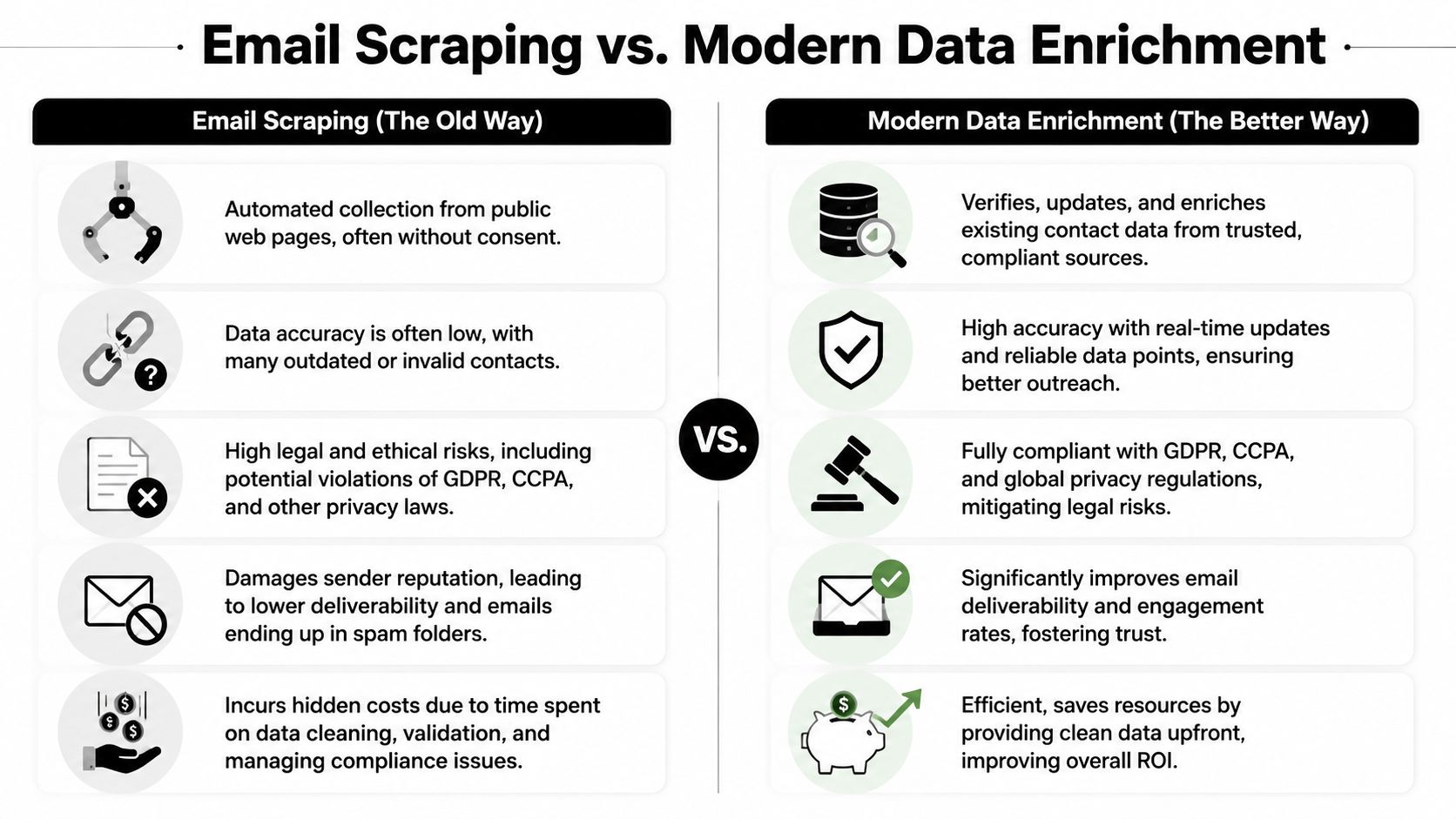
Old way versus better way
| Criteria | Traditional email scrapers | Modern data enrichment platforms |
|---|---|---|
| Data source | Public web extraction | Multi-source enrichment and verification |
| Core method | Pattern matching on visible text | Enrichment, validation, deduplication, workflow sync |
| Accuracy model | Variable, often dependent on what's publicly exposed | Higher-confidence records built from multiple sources |
| Compliance posture | Often unclear or inconsistent | Better suited to governed workflows |
| Operational fit | CSV-first, manual cleanup heavy | Better for CRM-connected processes |
| Impact on deliverability | Higher risk when list quality is weak | Better aligned with controlled outreach |
| Cost reality | Cheap upfront, expensive downstream | More predictable when you count cleanup and reputation costs |
Why the difference matters in practice
A scraper answers one narrow question: what email-like strings can I pull from these pages?
A modern enrichment platform answers a broader operational question: how do I get usable prospect data into the CRM, keep it clean, and make it available to sales without creating downstream risk?
That's a different category of value.
For RevOps, the gap shows up in workflow design:
Scrapers start with extraction Teams often export, inspect, clean, validate, then import.
Enrichment platforms start with record quality The process is built around enrichment, validation, normalization, and sync.
That second model is more scalable if you care about lifecycle hygiene, attribution, territory management, and sender health.
What I'd recommend teams evaluate
If you're replacing an email scraper, don't just compare feature checklists. Evaluate the system around these criteria:
Data governance Can you explain how records are sourced and maintained?
Verification workflow Is validation built into the process, or is it a separate cleanup step?
Integration depth Does the platform fit your CRM, sequencing tools, and routing logic?
Pricing model Does usage encourage broad hygiene and enrichment, or does it make every row feel expensive?
Scale and speed Can the system handle production workloads without turning ops into a manual CSV team?
For teams doing this evaluation, this roundup of data enrichment platforms for 2026 is a useful reference point.
Where a platform like RevoScale fits
If your team wants to move away from scraper-led prospecting, RevoScale is one example of the newer model. It combines enrichment, email finding, verification, phone data, workflow automation, and integrations in one platform, with AI waterfall enrichment across 50+ data providers, 97%+ accuracy, sub-2-second enrichment speed, and bulk processing up to 250,000 records, based on the product details provided by the publisher.
That matters because it changes the job. You stop asking reps to find and fix contact data manually. You build a system that enriches, verifies, and routes records in a controlled workflow.
Better prospecting starts when data quality stops being the rep's side job.
How to Migrate to a Compliant and Effective Prospecting Workflow
Your SDR team has a full week of outreach queued. Half the list came from scraped sources, replies are thin, bounce risk is rising, and ops cannot tell which records are safe to keep. That is not a lead generation problem. It is revenue infrastructure debt.
Fix it in stages. Keep coverage for the sales team, but stop adding more bad data to the system while you rebuild the workflow.
Audit where scraped data enters the system
Start with source mapping. You need a clear answer to one question. Where does scraped data enter your pipeline, and where does it spread after that?
Check the obvious inputs first, then the quiet ones that create the most cleanup work later:
- Lead imports from CSVs and browser extensions
- Prospecting tools built on public-page extraction
- Sequencing workflows fed by thin lists with no sourcing history
- CRM fields where nobody can explain how the contact was obtained
This usually exposes the underlying issue. The scraper is only one symptom. The larger problem is that the team accepted unknown data lineage, weak standards, and manual exceptions because hitting activity targets felt more urgent than protecting deliverability and compliance.
Set standards before you pick tools
Do not start with vendor demos. Start with operating rules.
Define what a usable prospect record must contain. Define which sources are approved. Define what has to be verified before a contact can enter outreach. Define what gets blocked from sync into the CRM or sequencing tools. That is how you stop one risky shortcut from turning into a permanent process.
For teams selling into specialized sectors, targeting standards matter just as much as contact standards. If you are trying to improve account selection in markets like logistics or manufacturing, guidance on winning more import export business is a useful example of how market context should shape prospecting criteria before list building starts.
Choose infrastructure that removes manual cleanup
A replacement for scraping should support governed prospecting, not just email discovery.
Choose a platform that can enrich, verify, sync, and route records inside the same workflow. If your reps still have to export CSVs, patch missing fields, and run separate validation steps, you have not solved the problem. You have kept the same technical debt and spread it across more tools.
A practical shortlist should include:
Bulk processing The system should handle large volumes without manual babysitting.
API and workflow support It needs to fit your CRM, sequencing tools, and routing logic.
Built-in verification Verification should happen before outreach, not as a cleanup project after bounces.
Admin controls and source governance Ops needs approval paths, field rules, and visibility into record origin.
Useful places to start are RevoScale integrations, the RevoScale unlimited email finder, and this guide to sales prospecting best practices.
Roll out in phases
A clean migration gives sales a safer path that is also easier to use. Roll it out in sequence:
- Freeze new scraped imports
- Review legacy lists and retire records with unclear provenance
- Connect your CRM, enrichment, and verification workflows
- Train SDRs on approved sourcing paths
- Track data quality, deliverability, and conversion rates together
Measure the migration like an ops leader, not just a sales manager. Look at bounce rates, reply quality, duplicate creation, routing accuracy, and time spent on list prep. Those are the signals that tell you whether the new workflow is reducing technical debt or just hiding it.
The goal is bigger than replacing one tool. You are rebuilding prospecting as a controlled system the business can trust.
Build Your Pipeline on a Foundation of Trust
The old email scraper playbook survives because it promises speed. That promise is real. The value is usually not.
A scraped list can help you touch more records. It can also weaken compliance posture, lower deliverability, and push cleanup work onto the people who should be building pipeline. That tradeoff made sense when prospecting infrastructure was primitive. It doesn't make sense now.
The strategic shift is simple. Stop treating contact acquisition as a scavenger hunt. Start treating it like a governed data workflow.
When your team works from accurate, verified, well-sourced records, everything gets easier. SDRs trust the list. Marketing trusts segmentation. Ops trusts reporting. Leadership trusts the pipeline model.
That's the true upgrade. Not a shinier tool. A healthier revenue system.
Frequently Asked Questions About Email Scraping
Is email scraping illegal
It can create serious legal and compliance risk, especially when teams can't clearly justify sourcing, usage, or outreach practices. The bigger issue for most companies is that scraping often sits in a grey area operationally while creating obvious risk under privacy rules and platform terms. If your team has to argue after the fact about whether a contact should have been collected, the workflow is already flawed.
Can an email scraper find any email address
No. It can only extract what is publicly available or infer what looks like an email pattern from visible data. That means it's limited by what a site exposes and by the quality of the scraper's matching logic. Even when it finds something real, it may still be outdated, generic, or irrelevant to your target motion.
Why is a data platform better than a simple email scraper
Because prospecting doesn't end at extraction. You need validation, deduplication, enrichment, routing, and governance. A scraper gives you raw material. A modern platform gives your team a process.
Should SDRs use scraped lists if they're under quota pressure
No. Quota pressure is exactly when teams make bad data decisions that hurt them later. If your team needs more coverage, improve sourcing and enrichment. Don't feed weak contacts into a sequence and hope volume hides the problem.
What should I look for instead of an email scraper
Look for a system that supports compliant sourcing, built-in verification, CRM integration, bulk processing, and admin control. If you're comparing options, Hunter.io alternatives can help clarify what a more complete workflow should look like, and email validation tools for 2026 are useful if deliverability is already a concern.
If you're done patching over bad data, try RevoScale. You can start with a free trial and see what flat-rate pricing looks like when you're not forced into credit-based prospecting. If your team wants one workflow for enrichment, verification, outreach, and scale, this is the cleaner path.