
find business phone numbers
|2026-05-14
How to Find Business Phone Numbers: 2026 Sales Guide
Learn actionable methods to find business phone numbers using manual search and AI enrichment. Our guide covers validation, compliance, and CRM integration.
Your reps aren't failing because they won't pick up the phone. They're failing because they're dialing bad numbers, generic switchboards, and stale records that should've been filtered out before anyone entered a sequence.
That's the part a lot of teams miss when they try to find business phone numbers. They treat phone data like a one-off research task. A rep opens LinkedIn, checks the company site, runs a few searches, pastes a number into the CRM, and hopes it's usable. That process feels productive. It usually isn't.
Modern outbound teams need a system, not detective work. The goal isn't to collect more numbers. The goal is to route reps toward direct, valid, usable phone data that fits cleanly into CRM fields, dialing workflows, and compliance controls.
The Real Reason Your Cold Calls Aren't Connecting
An SDR starts the morning with a solid list and a decent talk track. By lunch, they've hit a string of voicemails, a disconnected line, a front desk, and a general inbox voicemail tree. The easy conclusion is that cold calling doesn't work anymore.
That conclusion is wrong.

Phone is still where business conversations happen. Phone calls drive 69% of all customer contact attempts, while email accounts for 16% and in-person visits 15%, according to these business phone statistics. But the same source shows that small and mid-sized businesses answer only 37.8% of inbound calls, which means most attempts never reach a live person.
Bad data looks like a channel problem
When reps keep dialing low-quality records, the team starts blaming execution.
They rewrite scripts. They change call blocks. They shuffle territories. None of that fixes the root issue if the number itself is wrong, outdated, or routed to the wrong place.
The operational question is simple. Are your reps calling people, or are they calling phone fields?
Practical rule: If your team is measuring call activity without measuring number quality, you're optimizing the wrong layer.
More dials won't rescue weak data
A lot of teams respond to poor connect rates by increasing volume. That usually creates more waste. Reps spend more time logging bad outcomes, managers see more activity but not more conversations, and RevOps ends up with a pipeline math problem that started as a data problem.
If you want better cold call performance, start with better records. That means finding direct dials, validating them before outreach, and building sourcing logic that scales beyond manual lookups. The teams that do this well usually treat phone data the same way they treat deliverable email data. It has to be refreshed, scored, and operationalized.
For a broader outbound framework, these sales prospecting best practices are a useful complement to the phone-specific process.
The Manual Grind and Its Hidden Costs
Many organizations begin with the same approach. They search the company website, click the contact page, skim LinkedIn, maybe check a directory, and paste whatever number looks plausible into the CRM.
That process is common because it's accessible, not because it works well.

What free methods usually return
Manual research is good at finding public business information. It's weak at finding the exact phone data an SDR needs.
You'll often get:
- Main office lines that route through reception
- Department numbers that go nowhere near the decision-maker
- Old listings from directories that haven't been refreshed
- Unstructured data copied into the wrong CRM field
- No verification layer before a rep starts dialing
That's why the “free” route has a hidden cost. It burns time and still leaves the rep with low-confidence data.
The gatekeeper problem is usually a sourcing problem
The core limitation is direct dial access. According to Saleshandy's guide to getting business phone numbers, 70-80% of initial calls hit gatekeepers, and free methods that produce generic switchboard numbers lead to a connect rate of less than 20% for decision-makers.
That lines up with what most outbound teams see in practice. If the source gives you a company-level number, you don't have a calling asset. You have a routing challenge.
A switchboard number can be useful for account research. It's rarely the right number for sequence-driven outbound.
Why manual prospecting breaks at scale
The issue isn't that manual research never works. It's that it doesn't compound.
One rep might find a few decent numbers by hand. A team of reps doing that every day creates:
| Manual task | What happens operationally |
|---|---|
| Searching websites | Reps spend selling time browsing instead of calling |
| Copying data by hand | CRM hygiene degrades fast |
| Using public directories | Confidence in the number is unclear |
| Testing numbers manually | Reps waste call blocks on validation |
Managers start seeing weird symptoms at this stage. Activity looks busy, but connects stay flat. Records exist, but nobody trusts them. The team has “data,” but not data that can support repeatable outbound.
A short walkthrough on the topic is worth watching before you redesign your process:
Manual search still has a place
There are narrow use cases where manual work is reasonable:
- Strategic accounts where a rep needs extra context before calling
- Very small lists where buying tooling would be overkill
- Final verification when an account is high value and worth the extra effort
But if your team regularly needs to find business phone numbers across hundreds or thousands of records, manual work stops being scrappy and starts becoming a bottleneck.
Automating Phone Discovery with AI Enrichment
A rep uploads 5,000 target accounts on Monday. By Tuesday, the team either has callable records routed into the CRM with clear confidence signals, or it has another week of manual research dressed up as prospecting. That difference usually comes down to system design.
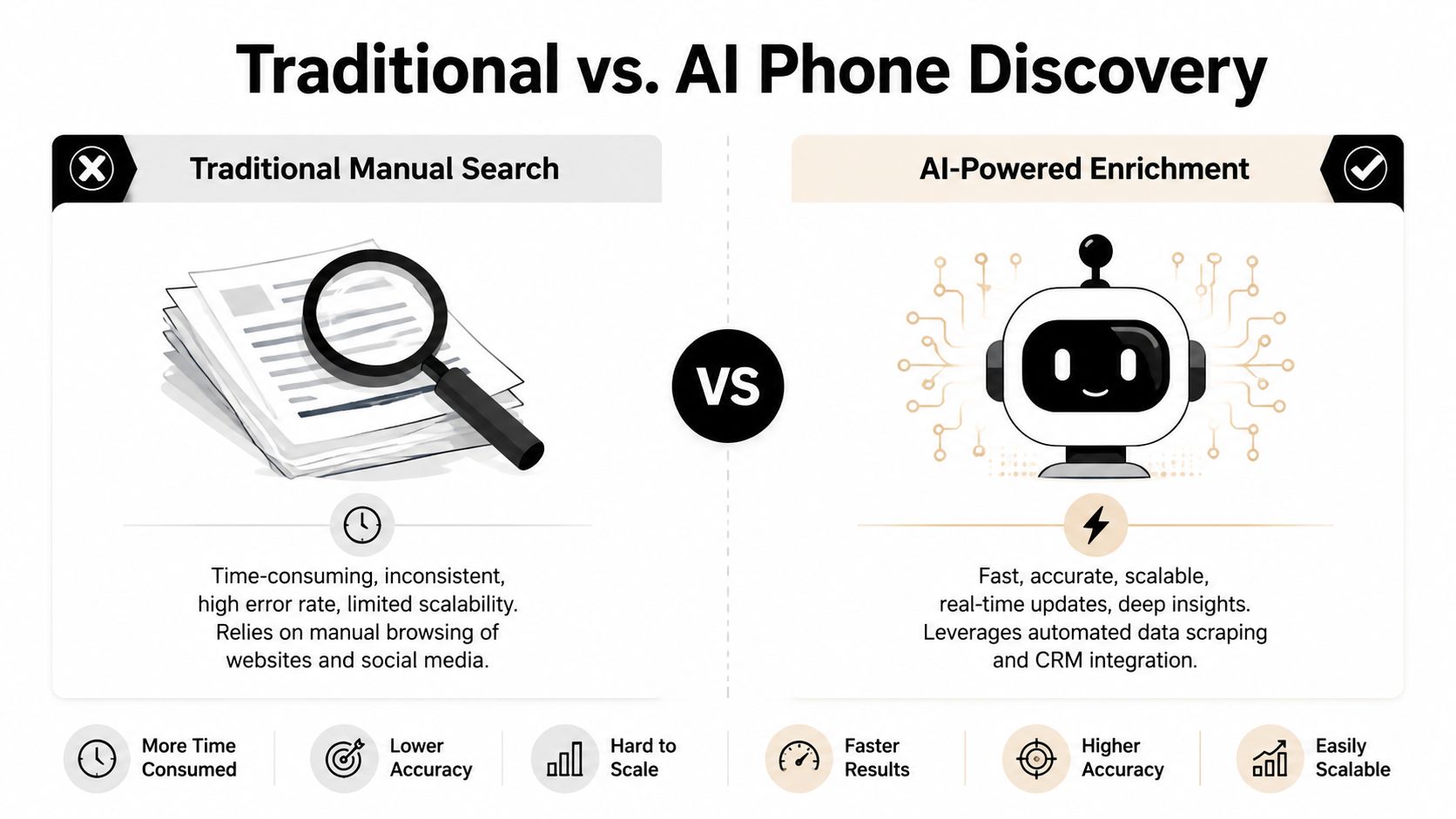
AI enrichment turns phone discovery into an operational workflow instead of a rep-level scavenger hunt. You send in a list of people or accounts, the system resolves likely matches across multiple sources, checks what meets your rules, and returns structured phone data your team can use.
What waterfall enrichment means in practice
The core design choice is waterfall enrichment. The system checks multiple providers in sequence rather than trusting a single database to have the right number. Apollo's overview of mobile business phone number tools describes this model as using 50+ data providers and producing much higher phone coverage than single-source databases.
That matters because outbound performance depends on coverage and trust. If the first source misses, the workflow keeps going. If a stronger match appears later in the chain, the system can prefer that result instead of settling for a weak company line.
Why single-source tools stall out
Single-source tools are simple to buy and easy to explain. They are also easy to outgrow.
Every provider has blind spots. Some are stronger on direct dials. Others do better with mobile coverage, SMB accounts, or certain regions. A single-source setup forces your team to inherit one vendor's gaps. A waterfall workflow spreads that risk across several datasets and applies decision logic before the record ever reaches a rep.
A useful enrichment process usually includes four parts:
Minimal-input matching
Name, company, title, domain, or CRM data should be enough to start the search.Source prioritization
Higher-confidence sources should run first, with fallback logic behind them.In-process validation
The workflow should check whether a number is usable before writing it back.Structured output
Results should land in clear fields such as mobile phone, direct dial, company line, and confidence status.
The operational gain is consistency
A primary win is not speed alone. It is repeatability.
RevOps can set match thresholds, define which phone types reps should use, map fields cleanly, and automate enrichment across imports, form fills, or outbound list builds. That is a much better operating model than asking each rep to decide, record by record, whether a number looks trustworthy.
I have seen teams improve phone programs fastest when they stop treating enrichment as a research task and start treating it like infrastructure. Once the rules are set, the workflow scales across hundreds or thousands of records without creating new process debt.
Where platforms fit
Tools like ZoomInfo, Apollo, Cognism, and data enrichment platforms built for automated workflows sit in this layer of the stack. The meaningful differences are usually operational:
- how many sources they check
- how they rank conflicting matches
- whether validation happens before CRM writeback
- how clean the output fields are
- whether pricing supports broad, recurring enrichment instead of rationed usage
A better model for phone discovery
The better question is not how to find one person's number. The better question is how to make sure every target record gets the best available phone data before sales touches it.
That shift changes the role of the rep. Less time goes to searching. More time goes to calling people who are more likely to answer.
Validating Phone Numbers to Maximize Connect Rates
Finding a number is only half the job. The second half is deciding whether the number is worth a rep's time.
That's where a lot of phone workflows fall apart. Teams enrich records, see a populated phone field, and assume the data is usable. In practice, phone records decay, route incorrectly, or fail basic compliance checks.
Validation is not optional
A modern phone workflow should treat validation as part of enrichment, not a separate cleanup project.
Useful validation usually includes:
- Carrier lookup to confirm the number is structurally valid and routable
- Line type identification to distinguish mobile, direct, and business lines where possible
- Real-time checks that catch obviously dead or unusable records before they hit a sequence
- Compliance scrubbing so the team doesn't dial numbers that should have been excluded
Stale phone data creates false confidence. The record looks complete in the CRM, but the rep still loses time to dead ends.
What a strong validation workflow looks like
RevOps teams usually get cleaner outcomes when they define clear statuses for phone records instead of dumping everything into one field.
A practical setup looks like this:
| Field | Purpose |
|---|---|
| Direct Dial | Best available personal business number |
| Mobile Phone | Used when mobile outreach is allowed by policy |
| Company Line | Fallback only, not a preferred outbound number |
| Validation Status | Approved, review, or exclude |
| Confidence Notes | Helps reps know how aggressively to use the record |
This structure gives reps context. It also gives ops teams a way to automate routing and suppression.
Field discipline matters more than volume. One validated direct dial in the right field is worth more than a spreadsheet full of unscored numbers.
Manual test dialing is the wrong validation method
Some teams still rely on reps to test numbers live. That creates two problems.
First, it wastes prime selling time on data QA. Second, it pushes quality control downstream to the most expensive part of the process. By the time a rep discovers a number is bad, the system has already failed.
A stronger workflow validates before assignment, tags the result clearly, and only hands usable records to the people making calls.
Don't separate quality from compliance
Validation also needs to account for policy and legal controls. A number can be technically valid and still unsuitable for outreach if your scrubbing rules or regional requirements say otherwise.
That's why the best phone workflows don't stop at “found.” They move records through a simple sequence:
- Match the person
- Find the number
- Validate the number
- Check suppression and policy rules
- Push only approved records into outbound
If any one of those steps is missing, connect rates and risk both get worse.
Integrating Phone Data Into Your Sales Workflow
Good phone data still won't help if it lands in the wrong place, triggers the wrong sequence, or disappears into a custom field nobody uses.
Activation is where most phone projects either become pipeline or become clutter.
Map fields like an ops team, not like a list broker
If you want to find business phone numbers and use them, the first step is CRM structure.
At minimum, separate these fields:
- Mobile phone
- Direct dial
- Main company number
- Last validated date
- Call eligibility status
- Source or confidence note
Don't let imports overwrite stronger existing records without rules. In HubSpot or Salesforce, that usually means setting update logic so a validated direct dial can replace a generic company line, but a weak fallback match can't overwrite a trusted number.
Build phone into the cadence, not around it
A lot of teams add calls as an afterthought. That creates awkward sequences where the rep sends three emails, then randomly dials a front desk because nobody designed the cadence around actual phone availability.
A cleaner approach is to branch based on phone quality.
Example of a practical multi-touch pattern
Day 1
Send email and create a call task only if a validated direct dial exists.Day 3
Call the direct dial. If there's no answer, leave voicemail only if that matches your team policy.Day 5
Send a follow-up email that references the reason for outreach, not the missed call.Day 7
Use LinkedIn or another approved channel to reinforce recognition.Day 9
Make a second call attempt if the record remains eligible.
This works better than forcing every prospect into the same pattern regardless of data quality.
A connected workflow is much easier to maintain when your enrichment and downstream tools already sync. For teams standardizing that layer, RevoScale integrations show how phone data can move into the rest of the sales stack without custom glue work.
Callback rates depend on the number prospects see
There's another layer often overlooked. The prospect's number matters for connect rate, but your callback number matters too.
According to RingBoost's research on vanity numbers, vanity numbers are 14 times more memorable than generic numeric numbers and can generate response lifts of up to 84%. If your team runs outbound programs that rely on voicemail callbacks, branded or memorable callback lines can improve recall.
That doesn't replace good targeting. It complements it.
A direct dial gets you to the right person. A memorable callback number makes it easier for that person to call back later.
Keep reps out of formatting work
Once the workflow is live, reps shouldn't be normalizing numbers, guessing which field to use, or deciding whether a company line is sequence-safe. That's RevOps work. The system should handle field mapping, status assignment, and sequence eligibility before the record reaches the rep.
When phone data is integrated properly, the rep sees one thing. A clear next action.
Understanding Compliance for Phone Outreach
Phone outreach gets messy when teams treat compliance as a legal memo instead of an operating rule. Reps need clear guardrails they can follow inside the workflow.
Keep the rules simple and enforceable
For US outreach, teams usually need a clear process around consent, internal suppression logic, and Do Not Call handling. For EU and UK outreach, the standard gets more contextual, especially when personal data is involved and you're relying on a business justification for contact.
The exact legal interpretation depends on jurisdiction and counsel. The operational takeaway is straightforward: document why the contact belongs in your outreach motion, keep records current, and honor opt-outs immediately.
Compliance habits that actually reduce risk
A workable phone program usually includes:
- Scrubbing before outreach against applicable suppression lists and internal exclusions
- Recording lawful basis or business rationale where your process requires it
- Honoring opt-outs fast across CRM, dialer, and sequencing tools
- Limiting access to sensitive data based on role
- Keeping audit trails so ops can prove what happened and when
If your team also uses chat and web lead capture, it helps to review adjacent privacy guidance such as these Live chat GDPR regulations, because the same data governance habits often carry across channels.
Compliance should live in the system
This is one reason enterprise teams care about controls like SOC 2 Type II, SSO, RBAC, and audit logs. Those features don't make outreach compliant by themselves, but they make it easier to enforce your own policy consistently.
That is the true standard. Not whether a rep promises to be careful, but whether the workflow prevents sloppy behavior in the first place.
Stop Hunting for Numbers, Start Building Pipeline
The teams that win with phone don't rely on rep persistence alone. They build a repeatable process for sourcing, validating, routing, and using direct phone data inside the sales workflow.
That's the shift that matters when you want to find business phone numbers at scale. Stop treating phone discovery as manual research. Treat it like infrastructure.
If you're also setting up the calling side of the operation, this guide to business phone line setup is a useful operational reference.
Once the system is in place, reps spend less time searching and more time talking to the right people. That's what turns phone data into pipeline.
If you want a cleaner way to enrich, verify, and activate contact data, try RevoScale. It offers a free trial, flat-rate pricing, and unlimited usage, which makes it a practical alternative to credit-based tools such as Lusha and Apollo.io for teams that don't want phone discovery constrained by per-record costs.