
outbound sales lead generation
|2026-05-08
Master Outbound Sales Lead Generation for 2026
Build a high-performing outbound sales lead generation engine with our 2026 playbook. Covers ICPs, AI, automation, and compliance for repeatable pipeline.
Most outbound sales lead generation problems don't start with messaging. They start with operations.
A new SDR joins, opens LinkedIn Sales Navigator, exports a rough list, hunts for emails in two other tools, cleans the spreadsheet by hand, and pushes records into the CRM. By the time the first sequence goes live, part of the data is already stale. Replies are thin. Call tasks are disconnected from email activity. The team blames copy, then channels, then effort.
Usually, the actual issue is simpler. The process isn't built to produce reliable inputs.
Modern outbound works when the system is tight from the first record to the booked meeting. That means clear targeting, verified data, structured sequencing, and CRM hygiene that doesn't depend on reps remembering admin work after their shift. When those pieces are missing, outbound becomes expensive busywork. When they're connected, it becomes a repeatable pipeline motion.
The Modern Challenge of Outbound Prospecting
An SDR starts Monday with a fresh territory, three data tools, and a quota tied to meetings. By Friday, half the list is already questionable, email replies are thin, and call tasks live in a different system than the email activity. That is the modern outbound problem. The work breaks long before anyone can judge the copy.
The market changed. Buyers screen unknown senders harder, ignore generic sequences faster, and expect sales outreach to reflect what they already know about their own business. Teams that still treat outbound as list pull, sequence launch, then volume usually get the same result. Low replies, poor connect rates, CRM mess, and a lot of debate about whether email or calling still works.

What breaks first is usually the handoff between steps.
A rep builds a list in Sales Navigator, finds contacts in one tool, verifies emails in another, uploads a CSV into the CRM, then starts sequencing before the records are fully checked. Every gap creates a downstream cost. Bounces hurt domain health. Missing direct dials weaken call blocks. Bad account ownership creates duplicate outreach. Weak activity logging makes it impossible to tell whether the issue is targeting, channel mix, or rep execution.
That is why outbound now needs an operating system, not a stack of disconnected point tools. An all-in-one workflow in a platform like RevoScale gives a new team one place to build lists, enrich contacts, launch sequences, and keep CRM records clean. The value is not convenience alone. It is control. You can see where records fail, which steps are slowing reps down, and whether the team is following the same process every time.
What breaks in most new outbound teams
The pattern is consistent:
- Targeting is too loose: reps pull broad account sets that match a market category but not a real buying pattern.
- Contact data decays fast: titles change, emails bounce, and phone coverage is uneven before the first sequence finishes.
- Channels run in silos: email, LinkedIn, and calling happen as separate rep habits instead of one coordinated motion.
- CRM hygiene depends on rep discipline: notes, dispositions, and ownership updates happen late or not at all.
Phone still belongs in that mix, especially for teams selling into accounts where inbox competition is heavy. If your team needs a practical view on where calls fit in a modern sequence, Cloud Move's outbound calling guide is a useful companion resource.
A simple test helps here. If reps spend more time fixing records, finding numbers, and updating fields than speaking with prospects, the outbound engine is not ready to scale.
Precision beats activity volume
Older outbound models rewarded bigger lists and more touches. That approach now creates avoidable waste. Reps work accounts that were never a fit, managers read noisy conversion data, and ops teams clean up the CRM after the campaign is already underperforming.
A better model starts with process discipline. Define the account pattern clearly, translate it into filters, validate the contacts before launch, and log every touch back to the CRM automatically. If you need a starting point for that targeting work, this ideal customer profile template is a practical reference.
This sounds simple. In practice, teams often skip steps because the workflow lives across too many tools. That is the core challenge in outbound prospecting now. Building a system that produces clean inputs, coordinated execution, and reliable reporting every time.
Build Your Targeting Foundation with a Dynamic ICP
The fastest way to waste outbound effort is to treat ICP like a slide in a kickoff deck instead of an operating filter.
Marketers already feel that pain. Instantly's lead generation statistics report that 61% of marketers say finding quality leads is a top challenge, and only 56% of companies verify leads before passing them to sales. That combination creates predictable downstream problems. SDRs work bad lists, managers see weak conversion, and everyone argues about channel performance when the underlying issue is audience quality.

Describe the customer in plain English
A practical ICP starts with how operators talk, not how strategy docs read.
Examples:
- Good: SaaS companies in North America with a mid-market sales team, active hiring, and a modern CRM
- Better: Vertical SaaS firms with a transactional sales motion, sales leadership in place, and signs they need cleaner prospect data
- Best: Companies with a known stack, a likely outbound motion, and a reason to change now
A platform like RevoScale can translate plain-English ICP inputs into list criteria you can work with, rather than forcing reps to build filters field by field before they've even pressure-tested the market.
Use three signal layers
Many organizations over-index on firmographics and stop there. That's rarely enough. A stronger ICP has three layers:
- Firmographic fit: Industry, geography, employee range, revenue band, business model
- Technographic fit: CRM, sales engagement stack, support platform, ecommerce system, data tools
- Intent and timing signals: Hiring trends, funding events, leadership changes, expansion moves, new market activity
The point isn't to chase every signal. It's to decide which ones correlate with successful conversations in your market.
Good outbound targeting doesn't ask, “Who could buy?” It asks, “Who is likely to respond to this motion right now?”
Source broadly, refine later
Raw list building should be fast. Don't ask SDRs to fully verify every contact at the sourcing stage.
Useful raw inputs include:
- LinkedIn Sales Navigator: Strong for account and persona discovery
- Google Maps: Helpful for local and service-area businesses
- Internal CRM history: Closed won, closed lost, and dormant account patterns
- Partner and customer lookalikes: Often the cleanest signal for initial expansion lists
Once you've drafted the ICP, it helps to formalize it in a shared worksheet or scoring template. This ideal customer profile template gives teams a practical structure for turning broad market assumptions into fields sales and ops can use.
A short walkthrough helps when you're building this with a new team:
Keep the ICP dynamic
New teams often freeze the ICP too early. Don't.
Review it against real outcomes:
- Which segments book meetings fastest
- Which titles reply but don't convert
- Which sub-industries create long cycles and low fit
- Which trigger events consistently create urgency
An ICP should tighten as evidence comes in. If it never changes, it's probably too vague to guide outbound.
Achieve 97%+ Accuracy with AI Enrichment and Validation
Monday morning, an SDR uploads 4,000 accounts, starts prospecting, and finds the same problems by lunch. Half the contacts are missing. Some emails bounce. A few leads left the company months ago. The team thinks it has a pipeline problem, but the failure started earlier in the workflow.
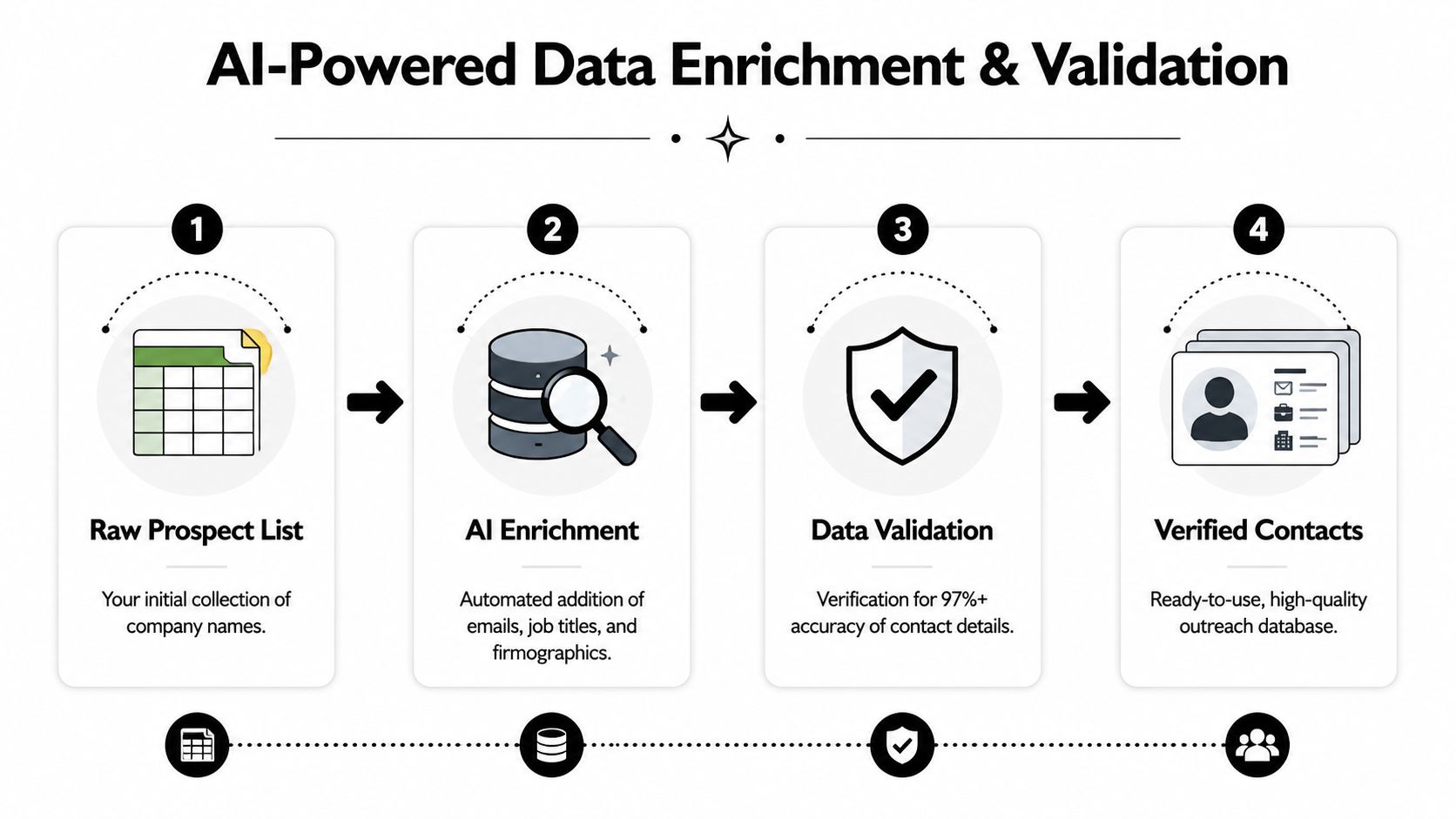
A raw list does not give a new outbound team much value. The usable version comes after enrichment and validation, when company names become matched contacts, verified emails, direct dials, firmographic fields, technographic data, and buying signals that can feed routing, sequencing, and personalization. If that layer is weak, reps spend their day fixing records instead of creating meetings.
Why single-source data breaks
One-provider data stacks look simple on paper. In practice, they fail in predictable ways.
- Coverage gaps: The account is present, but the right contact is not.
- Stale records: The person changed jobs, moved teams, or no longer owns the problem.
- No fallback path: If the first source returns nothing, the process stalls.
- Manual cleanup: Reps open three more tools to finish one record.
That setup creates hidden operational drag. RevOps sees it in lower connect rates, SDR managers see it in slower list production, and reps see it as wasted research time between touches.
How waterfall enrichment changes the workflow
A better process checks multiple providers in sequence and validates the result before the record reaches a sequence. If source one misses, source two runs automatically. If an email looks risky, it gets filtered out before it can hurt deliverability. That is the difference between a list that looks large in a spreadsheet and a list a rep can work.
| Problem | Manual workflow | Waterfall workflow |
|---|---|---|
| Missing emails | Rep searches other tools | System checks additional providers |
| Unverified contacts | Rep guesses or skips | Validation happens before sequencing |
| Sparse account context | Research added later | Context is added during enrichment |
| Slow list build | Hours of cleanup | Records become usable quickly |
This is one reason all-in-one systems tend to outperform point tools for early outbound teams. RevoScale's unlimited email finder combines enrichment, email finding, verification, phone discovery, and workflow automation in one system. It uses an AI waterfall across 50+ data providers, supports bulk processing up to 250,000 records, and returns 97%+ accuracy with sub-2-second average enrichment, based on the product specifications in the publisher brief.
The trade-off is control versus speed. A point-tool stack can give ops teams more flexibility if they already have clean routing, clear ownership, and engineering support for sync logic. Most new outbound teams do not. They need one workflow that can source, verify, enrich, and push records into the CRM without introducing five new failure points.
Validate before a record hits a sequence
Validation should sit before outreach, not after the first bounce report.
Use a simple gate:
- Verify the email first: This protects sender reputation and removes bad records before launch.
- Confirm the role next: A valid inbox still fails if the person no longer fits the motion.
- Append phone data after that: Reps need another path when email engagement is low.
- Add context fields last: Hiring activity, funding, tech stack, and recent news support better messaging.
The ordering matters. If teams enrich everything first and validate later, they spend money on records they should have discarded. If they skip validation completely, the cost shows up in bounce rates, weaker domain health, and rep mistrust of the system. This guide on how to validate emails before outbound campaigns is a useful reference for building that checkpoint into the process.
AI also has a practical role here before copywriting starts. It can score record confidence, choose provider order, flag mismatched job titles, and help decide which leads are ready for sequencing versus manual review. This overview of AI strategies for business lead generation is a useful read if you are deciding where automation should sit between list building and rep execution.
A list is ready when a rep can trust the next record without opening LinkedIn, checking a second database, and fixing the CRM by hand.
Design Automated Multi-Channel Outreach Sequences
Once the data is trustworthy, the sequence design matters more than volume. Most outbound teams still lose deals before discovery because they either under-follow up or they run one-channel outreach that's easy to ignore.
That's expensive, especially when lead readiness is low. G2's lead generation statistics state that 73% of leads aren't sales-ready on first contact and 79% of marketing leads never convert due to poor nurturing. The same source recommends a 5-8 touch cadence over 3 weeks for conversion.
A simple sequence beats a clever one
Early-stage outbound teams often overcomplicate sequencing. They build branches for every possible action before they've proven a baseline motion.
Start with one sequence that your team can execute consistently across email, LinkedIn, and phone.
Sample 14-Day Multi-Channel Outbound Sequence
| Day | Channel | Action |
|---|---|---|
| 1 | View profile and send connection request with no pitch | |
| 2 | Send a short first-touch email tied to role or company context | |
| 4 | Phone | Call, leave a concise voicemail only if relevant |
| 5 | Follow up with a different angle, not a bump | |
| 7 | Engage with recent company or leadership activity if it's genuine | |
| 9 | Phone | Second call attempt referencing prior outreach |
| 11 | Share a concrete observation or question tied to likely pain | |
| 14 | Email or LinkedIn | Close the loop politely and invite future timing if it's not a fit |
Why each channel has a job
Don't use every channel the same way.
- LinkedIn builds familiarity: It lowers friction before the inbox ask.
- Email carries the core message: It gives you room for relevance and a clear CTA.
- Phone validates urgency: It surfaces timing, ownership, and objections faster than waiting for inbox behavior.
If email sequencing is currently split across separate finder and outreach tools, consolidating that workflow usually removes more friction than teams expect. This comparison of a Hunter.io alternative is useful if you're trying to unify email discovery, verification, and sequencing in one motion.
Build branches only where they change rep action
Automation helps when it reduces admin. It hurts when it creates complexity no one manages.
Good branches:
- Opened but no reply: Queue a call task or a tighter follow-up
- LinkedIn accepted: Send a softer second touch there
- Replied with no fit: Route to nurture or suppress future touches
- Bounced or invalid: Trigger re-enrichment or remove from sequence
Bad branches:
- Tiny copy variations no one reviews
- Over-engineered timing differences with no performance signal
- Parallel sequences that create duplicate activity across reps
A clean workflow matters more than a fancy one. Teams looking at this from an operations standpoint should review how automated lead generation software handles sequencing, routing, and trigger logic before adding more channels.
Field note: The sequence should tell the rep what to do next without opening three systems and a spreadsheet.
What usually fails in multi-channel outreach
Three patterns show up repeatedly:
Pitching too early
The first message asks for a demo before trust exists.Repeating the same copy everywhere
Prospects don't need the email pasted into LinkedIn and voicemail.No task discipline
Calls get skipped because they aren't tied to engagement or calendar blocks.
The best multi-channel sequences feel coordinated, not loud. Prospects should notice consistency, not pressure.
Implement Personalization and CRM Hygiene at Scale
Personalization gets talked about like a copywriting issue. It's really a data operations issue.
Reps can't write relevant messages at scale if the account record has nothing useful in it. And even when you enrich the record once, data decay starts immediately. People change jobs, responsibilities shift, companies add tools, teams reorganize, and stale CRM fields poison outreach.
That's why personalization and CRM hygiene should be designed together.
Use enriched fields to personalize the opener
SalesGenie's lead generation statistics report that 79% of leads fail to convert due to poor nurturing. The same source says companies that excel at nurturing generate 50% more sales-ready leads at 33% lower cost, and that marketing automation can increase qualified lead volume by 451%.
Those gains don't come from adding a first name to the subject line. They come from using actual context.
Useful personalization inputs include:
- Recent company activity: Hiring, product launches, expansion, leadership changes
- Tech stack clues: Systems that imply workflow pain or integration needs
- Role-specific triggers: A VP Sales and a RevOps manager should not get the same opener
- Territory nuance: Enterprise, SMB, and agency buyers respond to different business pressure
The test is simple. If the first line could be sent to fifty companies unchanged, it isn't personalized enough to matter.
Keep the CRM alive after the first sync
Most CRMs decay because teams treat enrichment as a one-time import task. It should be an ongoing workflow.
Connect your outbound system to the CRM and automate updates for:
- Email and phone verification refreshes
- Job change detection
- Company attribute updates
- Duplicate management
- Lifecycle routing based on engagement
That's where integrations matter more than feature checklists. A connected stack keeps outbound, account data, and handoff history aligned. If your current motion still requires CSV exports between systems, review your options for CRM and workflow integrations.
Better personalization raises engagement. Better hygiene keeps that personalization from degrading a month later.
Build a closed loop between reps and ops
The strongest outbound teams create a feedback loop instead of treating data quality as a one-way ops function.
Use rep feedback to tag:
- wrong contacts
- bad role matches
- duplicate accounts
- weak trigger signals
- messaging that drew replies but low-fit conversations
Ops can then push those signals back into enrichment rules, suppression logic, and ICP filters. That loop is what makes outbound sustainable. Without it, the same data problems come back every quarter under a new campaign name.
Measure What Matters and Ensure Outbound Compliance
A new outbound team can look productive in week two and still be failing by week six. The dashboard shows send volume, task completion, and maybe even open rates. Then the first pipeline review happens, and there is not much to show for it.
That gap usually comes from measuring execution instead of sales progress.
Track commercial outcomes, not busy metrics
Start with the numbers that show whether outbound sales lead generation is creating pipeline:
- Meetings booked
- Qualified opportunities created
- Pipeline generated
- Conversion between sequence stages
- Cost per qualified opportunity
Review them weekly, by segment, rep, and sequence. A single blended number hides too much. If one sequence books meetings but never creates qualified pipeline, the problem is often weak targeting or loose qualification. If replies are solid but meetings lag, the offer or call-to-action usually needs work. If cost per qualified opportunity keeps climbing, list quality, channel mix, or contact coverage has probably slipped.
I also watch time-to-first-meeting and meeting-to-opportunity conversion. Those two numbers expose friction fast. They show whether the issue sits in outreach, in rep follow-up, or in the SDR to AE handoff.
Open rate still has diagnostic value. It just should not sit at the center of the scorecard.
Put compliance inside the operating system
Compliance fails when it lives in a slide deck instead of the workflow. Reps move fast, imports happen under deadline, and one manual exception turns into a pattern.
Convoso's outbound lead generation analysis makes the broader point clearly. Teams run into pauses, complaints, and legal risk when consent rules and contact controls are handled inconsistently. The practical response is simple. Build the controls into the system that sources data, routes records, and sends outreach.
That means a few things have to be configured from the start:
- Role-based access controls so exports and sensitive fields are limited to the right users
- Audit logs so ops can trace field changes, imports, and suppression updates
- Persistent opt-out and suppression rules across email, phone, and sequence tools
- Region-specific sending rules based on prospect location and contact method
- Data retention rules so stale or restricted records are not sitting in active workflows
This is one reason I prefer running outbound through a single operating layer when possible. If enrichment lives in one tool, sequencing in another, opt-outs in a third, and CRM updates happen through CSV uploads, mistakes creep in fast. A connected system like RevoScale gives ops one place to monitor record status, suppression logic, enrichment freshness, and sequence activity without chasing conflicts across the stack.
Keep the scorecard tight. Keep the controls tighter. That combination is what turns outbound from a campaign into a repeatable system.