
company email domain finder
|2026-05-15
Company Email Domain Finder: A Guide to Finding Any Domain
Need a company email domain finder? Learn manual and automated methods to find and verify any company's email domain for accurate B2B outreach in 2026.
You've got a target account list, a few LinkedIn profiles, maybe a CSV from marketing, and one immediate problem. You still don't know the right company domain, which means you can't reliably find the right work email.
That bottleneck slows down almost every outbound motion. SDRs lose hours checking websites, guessing domains, and validating addresses one by one. RevOps teams inherit the cleanup when bad domains flow into the CRM, sequences launch anyway, and bounce issues start hurting deliverability.
Most content about a company email domain finder starts too late. It assumes you already have the domain and only need emails from it. Real prospecting rarely works that cleanly. Sometimes you have a company name with multiple subsidiaries. Sometimes you have a person's LinkedIn profile and a vague employer name. Sometimes the account changed branding, uses a parent domain, or operates different regional sites.
Why Finding the Right Domain Is Your First Sales Hurdle
A domain isn't just a lookup field. It's the key that opens access to the rest of your outbound workflow.
If the domain is wrong, every step after that gets worse. Email permutations miss. Verification results become noisy. CRM enrichment maps to the wrong account. Sequencing tools push messages to addresses that never had a chance to work.
Hunter's product structure makes this gap obvious. It separates Domain Search from name-and-company lookup and browser or CSV workflows, which reflects a real operational truth: sales teams often start before the domain is known at all, not after it's identified. That's the workflow problem most feature-led content skips over, as reflected in Hunter's domain search workflow{rel="nofollow"}.
What the SDR actually has at the start
Most reps begin with incomplete identity data, such as:
- A company name only that may be abbreviated, rebranded, or shared by multiple businesses
- A LinkedIn profile where the employer field doesn't match the company's public web presence exactly
- An event list or lead form with partial company information and inconsistent formatting
- A target account list built from firmographics, but without contactable domains attached
That's why “find emails by domain” isn't enough. The practical workflow is usually:
- resolve the company identity
- determine the right operating domain
- infer likely email patterns
- verify deliverability before outreach
Practical rule: Treat domain discovery as account resolution, not contact lookup.
Teams that skip that mindset usually create downstream cleanup work for themselves. The domain finder becomes useful only when it fits the messy front end of prospecting, not the neat version vendors prefer to show in product pages.
Manual Domain Finding Methods and Their Limits
The old way still works for one-off research. It breaks when a team needs repeatability.

When reps don't have a dedicated workflow, they usually combine search engines, company websites, LinkedIn, and technical checks. That can uncover a domain. It can also produce false confidence.
A 2025 benchmark from Dropcontact{rel="nofollow"} tested 15 email finders on 20,000 real contacts and found that the top real enrichment rate was 54.9%, with most tools clustering in the 25% to 45% range. The same benchmark reported wrong-domain error rates from 1% to 22.5%. That matters because a domain that looks plausible in research can still fail in real sending.
Searching the company website
This is usually the first move because it's obvious and free.
A rep visits the homepage, then checks pages that commonly expose company identity details:
- Contact and About pages often show the main brand domain clearly
- Privacy or legal pages can reveal the formal operating entity and canonical web address
- Blog author pages sometimes expose staff emails or confirm the company email pattern
- Footer links can help distinguish a product microsite from the actual corporate domain
This works best for straightforward companies with a single web presence. It gets messy fast when the visible site is a product brand, a regional branch, or a marketing microsite sitting under a separate parent company.
A common mistake is finding a domain, not the right one. The rep grabs a support domain, a holding company domain, or a country-specific site that doesn't match the team they're targeting.
Using search engines and operators
Google and other search engines help when the site itself is vague. Reps search the company name with terms like contact, privacy, team, press, or email format. They also scan indexed PDFs, press releases, and event pages.
The problem isn't whether this can work. The problem is labor. Multiply even a few minutes of research by a few hundred accounts and the work starts crushing rep capacity. Sales leaders who want a good breakdown of that burden should look at the impact of manual research on revenue teams{rel="nofollow"}.
For individual lookups, manual search is serviceable. For list building, it's a tax on pipeline creation.
You also run into stale pages. Search results may show domains that were valid during an old product launch, acquisition, or rebrand. Search engines don't care whether your sequence is launching today.
For teams handling occasional one-off investigations, an email address lookup workflow can help organize these checks, but it still doesn't solve the scale problem by itself.
Reading LinkedIn for domain clues
LinkedIn is useful because it gives context the website may hide. A company page can reveal alternate spellings, parent-child brand relationships, and employee counts that help verify you're looking at the right business.
Reps also use personal profiles to spot clues:
- Employer naming conventions can hint at whether the company uses a parent brand
- Profile links may point to a current site even when the company page is outdated
- Role locations can indicate whether a regional domain is more likely than the global site
The limitation is that LinkedIn often gives clues, not confirmation. It helps you narrow identity. It rarely closes the loop on deliverability.
Checking MX and domain signals
Some teams go one step further and inspect whether a discovered domain appears configured for email at all. That's smarter than pure guessing, but it still has blind spots.
Here's the issue in plain terms:
| Manual signal | What it tells you | What it doesn't tell you |
|---|---|---|
| Website presence | The company uses the domain publicly | Whether your target contact receives email there |
| LinkedIn match | The business identity is probably correct | Whether the domain is current for outreach |
| Mail setup clues | The domain likely handles email | Whether a specific mailbox is valid |
If your process ends at “the domain exists,” you haven't finished the job. You've only generated a candidate.
That's the hard truth behind manual domain finding. It's useful for discovery. It's weak for production outreach.
The Permutation and Validation Game
Once the domain is identified, many departments move into a second manual workflow. They start guessing the email pattern.
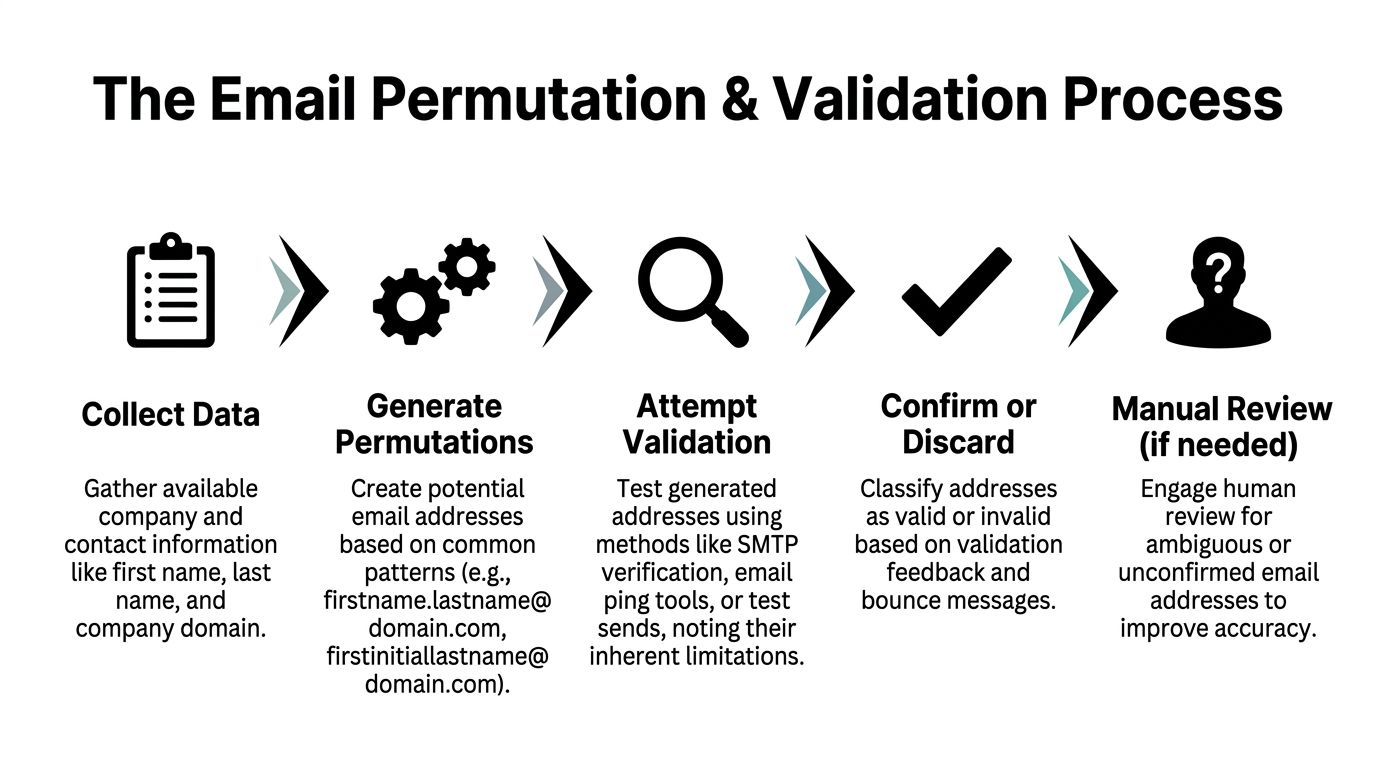
Sales representatives generate likely addresses such as first.last@company, first@company, or first initial plus last name. While that approach sounds efficient in theory, the actual process becomes a clunky chain of tabs, validators, spreadsheets, and judgment calls.
Why teams use permutations
The logic is sound. Most companies use repeatable email formats, so if you know the person's name and the company domain, you can produce a shortlist of likely addresses.
Typical workflow:
- collect first name, last name, and company domain
- generate multiple address permutations
- run them through a validator
- keep the one marked safest
- suppress the rest
That's often the only option when no published address exists. It's also where many teams confuse “valid format” with “safe to send.”
Where this workflow breaks
A proper workflow doesn't stop at syntax checks or simple domain checks. Scrapercity describes a stronger process that includes discovery, domain validation, SMTP-level checks, and confidence scoring. It also notes that emails with 90%+ confidence from that process typically see bounce rates below 1% in practice, according to Scrapercity's domain email finder workflow{rel="nofollow"}.
That matters because manual and semi-automated workflows usually fail in the gray areas:
- Catch-all domains accept many verification attempts, which makes risky addresses look safer than they are
- Outdated public records can preserve old patterns long after the employee left
- Role-based inboxes can verify technically while still being the wrong destination
- Partial validators may confirm the domain but not the mailbox state with enough confidence
A found email is a candidate. A verified email is an operational asset.
That's why stacking a free permutator on top of a basic verifier often creates friction instead of certainty. You still need to interpret edge cases, suppress questionable results, and decide whether to risk sender reputation on “maybe.”
What better validation looks like
The practical standard is simple. Use systems that expose verification depth, not just a green checkmark.
A stronger process should include:
- Domain confirmation so you know you're not working from the wrong company record
- Mailbox-level testing rather than relying on pattern confidence alone
- Confidence scoring that helps teams suppress risky addresses before export
- Workflow continuity so reps aren't copying data between multiple tools
If your team is reviewing validator outputs regularly, it helps to standardize what each status means and when to suppress or retry. A good starting point is this guide on how to validate emails.
The Automated Workflow for 97%+ Accuracy
A rep gets a company name from a webinar signup, a LinkedIn profile from Sales Navigator, and a half-complete CRM record from an old import. None of those inputs gives the email domain directly. That gap is where outbound slows down.

A workable system starts with messy account data and returns a domain you can use. The job is bigger than “find the website.” It has to resolve the right company, match that company to the correct domain, pull contact candidates, and verify whether those records are safe enough to pass into sequencing.
That is why teams outgrow single-purpose finders. If reps have to bounce between browser search, email finder, verifier, and spreadsheet cleanup, the bottleneck never really goes away. It just gets distributed across more tabs.
Why the market shifted to workflow tools
Email domain finding is now sold as an operating model, not a lookup utility. Vendors package some combination of search volume, verification depth, refresh cadence, and pricing mechanics. In practice, buyers are choosing how they want to pay for domain resolution and email confidence at scale.
That usually comes down to three models:
- Credit-based tools fit lighter prospecting volumes and one-off research
- Per-result validation pricing can make sense when teams only want to pay for records that pass checks
- Flat-rate platforms are easier to budget when ops teams enrich, re-enrich, and clean large datasets regularly
The trade-off is straightforward. Cheap lookup volume does not always produce usable records, and low per-credit pricing can get expensive once teams start reprocessing stale accounts or testing multiple inputs for the same company.
What an automated workflow should do
A strong company email domain finder workflow should complete the full path from uncertain input to sequence-ready output without manual handoffs:
| Workflow stage | Manual approach | Automated approach |
|---|---|---|
| Identity resolution | Rep researches company naming manually | System matches company name or profile to the likely domain |
| Contact discovery | Rep guesses patterns or hunts pages | System finds likely contacts tied to the account |
| Verification | Separate validator and manual review | System validates before export |
| Scale | Limited by rep time | Bulk processing for list-based motions |
This matters even more when leads do not start in a form fill or clean database. Some teams begin with social accounts, community profiles, or creator-led signals that still need account resolution before any outbound starts. For those workflows, tools with advanced Twitter profile scanning capabilities{rel="nofollow"} can sit upstream and feed better raw inputs into the rest of the enrichment process.
Later in the process, a product demo helps make the operational difference obvious:
What this looks like in practice
RevoScale starts from a company name, CRM record, CSV, or profile URL and waterfalls across more than 50 data providers. It returns enriched records with claimed 97%+ accuracy, sub-2-second enrichment speed, and bulk processing up to 250,000 records. For RevOps teams, the practical value is consolidation. Domain finding, email verification, phone enrichment, and outbound activation happen in one workflow instead of four separate steps.
That changes rep behavior. When the path from raw lead to verified record is standardized, SDRs stop improvising their own research process. Pipeline quality gets more predictable because the domain resolution step is no longer dependent on who was willing to spend 10 extra minutes hunting for a company website.
Cost control improves too. Many finders still meter activity by credit or by verified row, which makes teams hesitate before re-enriching stale records or cleaning an entire segment. Flat-rate pricing supports a different operating model. Ops can run hygiene and enrichment on schedule instead of treating each pass like a budget exception.
If you're comparing that model directly against a traditional finder, this breakdown of a Hunter.io alternative is a practical place to start.
The winning workflow disappears into the process. Reps start with incomplete company data and get back records that are ready for action.
Best Practices for Data Accuracy and Compliance
Finding a domain is only half the job. The rest is governing the data so it stays useful and safe to use.

Teams usually get in trouble in two ways. They trust low-confidence records too early, or they let once-good data sit untouched in the CRM until campaigns start failing.
Accuracy standards that hold up
RevOps teams should establish a few essential requirements:
- Prioritize verified over probable when deciding what enters a sequence
- Store source and confidence context so reps know whether a record was inferred, found, or validated
- Recheck stale records before reuse, especially when the lead has sat untouched for a while
- Separate account resolution from contact activation so the CRM doesn't treat every discovered domain as sequence-ready
For broader enrichment process design, this roundup of data enrichment tools is useful for comparing how teams handle coverage, freshness, and workflow fit.
Compliance is mostly about process discipline
You don't need legal theatrics to improve compliance. You need a repeatable operating standard.
That usually means:
- Use business context clearly and contact people in a role-relevant way
- Keep suppression and opt-out handling clean
- Avoid over-collecting data just because a source exposes it
- Document your enrichment and outreach process so RevOps, marketing, and legal aren't working from different assumptions
Clean data protects more than reporting. It protects sender reputation, sequence performance, and the team's ability to keep mailing confidently.
A professional outbound team treats data hygiene as part of deliverability, not a separate admin task.
Integrating Domain Data into Your Sales Tech Stack
A discovered and verified domain starts delivering value only when it moves into the systems your team already uses.
The cleanest setup is simple. Account records in the CRM get enriched with the right domain and company context. Contact records inherit verified emails and any supporting fields the team uses for routing, personalization, or prioritization.
What this looks like in an operating CRM
A common RevOps scenario goes like this:
A marketing list enters HubSpot or Salesforce with company names but no reliable domains. The enrichment workflow resolves the account identity, updates the correct website and company fields, then attaches verified contacts where available. SDRs don't need to research from scratch. They open the record and start with context already in place.
That's why native system connectivity matters. If your team is evaluating handoff options, the RevoScale integrations page shows the kinds of CRM and workflow connections worth prioritizing.
Pushing verified records into outbound tools
The second use case is activation. Once the email domain and contact data are validated, the record should move directly into sequencing without a CSV relay race.
That creates a cleaner chain:
- account enters CRM or enrichment queue
- domain resolves
- contact verifies
- outbound sequence launches
- replies and status sync back into the system of record
The less manual handling between those steps, the fewer avoidable errors your team introduces.
Teams that run combined outbound workflows across email and related channels should also think about message orchestration, not just enrichment. This guide on using OpenClaw for cold email outreach is useful for seeing how data and execution need to line up.
Domain data should support personalization too
A good domain record does more than enable an email send. It anchors the rest of the account context.
Once the right company is resolved, teams can tailor outreach with better firmographic signals, cleaner account ownership, and more relevant messaging. That's where a domain stops being a technical lookup and becomes the foundation for a better sales conversation.
Stop Searching, Start Selling
An SDR pulls a company name from a trade show list, grabs a LinkedIn profile, and then loses ten minutes trying to confirm the actual domain before writing a single line of outreach. Multiply that across a team and domain research stops being admin work. It becomes a pipeline tax.
Manual domain research still makes sense for a short list of high-value accounts. I still use it when the account is important enough to justify extra scrutiny. For routine outbound, though, it creates too much variance. Reps guess, records drift, and bad domains slip into sequences.
The teams that keep outbound predictable treat domain resolution as an operational step, not a scavenger hunt. Start with incomplete inputs. Resolve the right company. Verify the domain. Send only records you would trust in production.
That shift matters because the goal is not just to find a domain. The goal is to remove wasted research time between account identification and a usable contact record.
If your team is still spending selling hours on lookup work, it is worth changing the workflow, not just asking reps to search faster.
If you want to replace credit-based prospecting with a flat-rate workflow, try RevoScale. You can start with a free trial, use the unlimited email finder, and see how one platform handles enrichment, verification, and outbound without per-row pricing.